

 Food Delivery Printer Buying Guide
Food Delivery Printers by Platform, Model, and Connection Type
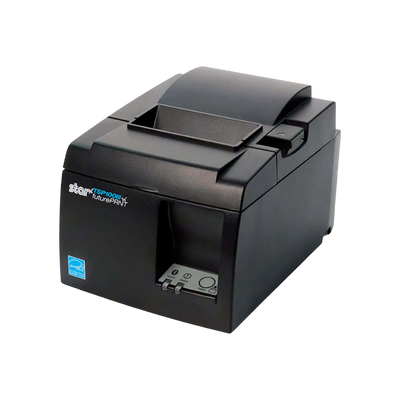
This guide lists the printer models publicly documented by major food delivery, online ordering, order aggregation, and restaurant order-management platforms. It then provides a dedicated feature on the Star Micronics TSP143IIIB and the delivery, POS, integration, driver, and development environments known to support the TSP100III Bluetooth family.
The models below are based on published platform documentation. Where a platform does not publish a universal bring-your-own-printer list, the guide says so rather than assigning unsupported models.
Six decisions to make before ordering a food delivery printer.
The exact printer model is only one part of the decision. The application receiving the order, the tablet or POS controlling the printer, the connection method, and the kitchen environment all matter.
Which platform prints the order?
Confirm whether the marketplace tablet, an order aggregator, the restaurant POS, or a browser-based dashboard sends the print job.
Bluetooth, Ethernet, Wi-Fi, or cloud?
Bluetooth is local to a tablet. Ethernet and Wi-Fi support shared network printing. Cloud printers are normally provisioned by the platform.
Counter or kitchen?
Use thermal printers at counters and cleaner prep areas. Use impact printers in hot, humid, or greasy kitchens when thermal paper is unsuitable.
Receipt, bag ticket, or item label?
Order receipts, kitchen tickets, bag tickets, and sticky item labels use different printer types and different media.
One channel or several?
A restaurant running several marketplaces may need multiple printers, one shared network printer, or an aggregator that consolidates orders.
Published list or POS-dependent?
Some platforms publish exact models. Others route orders through a POS or vendor-supplied hardware bundle and do not maintain a universal BYOD list.
Major delivery and online-order platforms restaurants plan around.
The list includes consumer marketplaces, direct-ordering platforms, enterprise ordering systems, catering channels, and order aggregators. Not every platform publishes a direct printer list.
DoorDash
MarketplaceDirect Bluetooth printing from supported DoorDash tablet workflows or printing through an integrated POS.
Uber Eats
MarketplacePublishes recommended and tested tablet printer models, with model availability varying by country and tablet program.
Grubhub
MarketplaceDocuments Bluetooth, Ethernet, and Wi-Fi Star TSP143III printer configurations for Grubhub tablets.
ChowNow
Direct OrderingCurrent printer support is documented through the ChowNow/Cuboh dashboard and includes Star and Epson models.
Olo
Enterprise OrderingPrinting normally follows the POS integration or Olo Expo requirements rather than one universal receipt-printer list.
Slice
Pizza Ordering & POSSlice Register includes vendor-managed hardware; a public universal BYOD printer-model list was not located.
ezCater
Catering MarketplaceOrders typically print through the restaurant POS, dashboard, email, or an integration. No public platform-wide model list was located.
Deliverect
Order AggregatorThe Delivery Manager App publishes an extensive list of supported Star and Epson printer models.
Cuboh
Order AggregatorCuboh, now part of ChowNow, supports documented Star TSP100/SP700 and Epson receipt and kitchen printer families.
Otter
Order Management & POSOtter publishes current BYOD, cloud, front-of-house, Bluetooth receipt, and sticker printer options.
All printer models publicly documented for the ten platforms.
The matrix distinguishes published model lists from regional lists, vendor-supplied systems, and POS-dependent workflows. Model names are preserved as the platforms publish them.
| Platform | Published Printer Models | Connection / Workflow | Documentation Status | TSP143IIIB Relevance |
|---|---|---|---|---|
| DoorDash |
Star TSP 654 BluetoothStar TSP 143 Bluetooth
DoorDash publishes family-level names rather than exact generation and part number.
|
Bluetooth to DoorDash tablet / Order Manager, or printing through integrated POS | Published list | TSP143 Bluetooth family match; verify the exact TSP143IIIB variant |
| Uber Eats |
Star TSP143IIIBIStar SM-L200Epson TM-m30cEpson TM-m10Star TSP143Star TSP143IIILANStar TSP143IIIWStar TSP654Star TSP654IIIEpson TM-m30Epson TM-m30IISunmi C04000069Sunmi C04004005
Uber's current U.S. and other official regional help pages publish different approved lists.
|
Bluetooth, LAN, Wi-Fi, and selected regional cloud-printer workflows | Region-dependent | Directly named by Uber Eats Orders |
| Grubhub |
Star TSP143IIILANStar TSP143IIIWStar TSP143IIIBIHP ePrint-enabled printerDesktop/network printer
|
Bluetooth, Ethernet, Wi-Fi, email/ePrint, desktop portal printing | Published list | Directly named by Grubhub |
| ChowNow |
Star TSP100 familyStar SP700 familyEpson TM-m30IIIEpson TM-m30II-SLEpson TM-M50Epson TM-m30II-NTEpson TM-L100Epson TM-U220B
Current printer documentation is published through the ChowNow/Cuboh support system.
|
Star LAN/Wi-Fi/Bluetooth; Epson Bluetooth/LAN or LAN-only by model | Published list | Covered under the Star TSP100 Bluetooth family |
| Olo |
Epson TM-T88VI (documented test model)AirPrint-enabled printersCloudPRNT-enabled printers
Olo does not publish one universal BYOD printer list for every deployment. Printing is often controlled by the integrated POS or Expo device.
|
POS integration, iOS AirPrint/CloudPRNT, Android ESC/POS service | POS/Expo-dependent | No universal direct TSP143IIIB support list published |
| Slice |
Slice Register vendor-supplied hardware
A public universal bring-your-own-printer model list was not located.
|
Slice Register / vendor-managed POS hardware | No public model list | Do not assume compatibility without Slice confirmation |
| ezCater |
POS-integrated printerDashboard/email printer
A direct platform-wide receipt-printer model list was not located.
|
POS integration, dashboard, email, or catering workflow | Workflow-dependent | No direct TSP143IIIB list published |
| Deliverect |
Star TSP100IIIWStar TSP100IIILANStar TSP100IIIBIStar TSP143IIILANStar TSP143IIIWStar TSP143IIIBIEpson TM-m30IIEpson TM-m30II-NTEpson TM-m30II-HEpson TM-m30IIIEpson TM-m50Epson TM-P20Epson TM-P20IIEpson TM-P60IIEpson TM-P80Epson TM-P80IIEpson TM-T100Epson TM-T70IIEpson TM-T81IIEpson TM-T81IIIEpson TM-T82IIEpson TM-T82IIIEpson TM-T82IIILEpson TM-T82XEpson TM-T88VEpson TM-T88VIEpson TM-T88VII
|
Bluetooth, LAN, Wi-Fi, and selected USB by model in the Delivery Manager App | Published list | Directly listed as TSP100IIIBI and TSP143IIIBI |
| Cuboh |
Star TSP100 familyStar SP700 familyEpson TM-m30IIIEpson TM-m30II-SLEpson TM-M50Epson TM-m30II-NTEpson TM-L100Epson TM-U220B
|
LAN, Wi-Fi, and Bluetooth depending on printer family and exact model | Published list | Covered under the Star TSP100 Bluetooth family |
| Otter |
Epson TM-m30Epson TM-m30iEpson TM-m30IIEpson TM-m30IIIEpson TM-M30 NTEpson TM-T88VIRongta RP328Rongta RP310Rongta 410
Cloud printers must be provisioned by Otter. RP310 is used for sticker labels.
|
Bluetooth, USB, Wi-Fi, Ethernet/cloud, and sticker label workflows by model | Published current list | TSP143IIIB is not on Otter's current published BYOD list |
Star Micronics TSP143IIIB: known platform and software compatibility.
The feature below focuses only on the TSP143IIIB/TSP143IIIBI2 and separates direct platform support, family-level support, POS support, documented software integrations, and Star development technologies.
TSP143IIIB / TSP143IIIBI2
The Bluetooth TSP100III combines high-speed direct-thermal receipt printing, an automatic cutter, an internal power supply, and Bluetooth support for compatible iOS, Android, and Windows environments. The current gray U.S. model is part number 39474710; the white model is 39474810.
Uber Eats Orders
DirectUber Eats directly names the Star TSP143IIIBI for Bluetooth printing from supported Uber Eats Orders tablets.
Grubhub for Restaurants
DirectGrubhub publishes setup instructions specifically for the TSP143IIIBI Bluetooth printer.
Deliverect DMA
DirectDeliverect lists both TSP100IIIBI and TSP143IIIBI as supported Bluetooth models on iOS and Android.
DoorDash Order Manager
Family-LevelDoorDash lists the Star TSP 143 Bluetooth family. Verify that the exact TSP143IIIB variant is approved for the merchant's tablet program.
ChowNow / Cuboh
TSP100 FamilyThe current ChowNow/Cuboh printer list supports the Star TSP100 family over Bluetooth, LAN, and Wi-Fi.
Shopify POS
SupportedShopify lists the Star TSP143IIIBI2 as a supported Bluetooth receipt printer in North America and other supported regions.
ADDMI
Documented IntegrationStar has documented restaurant and food-truck deployments using ADDMI with the TSP143III family.
MunchEm / OrderEm
Documented IntegrationMunchEm added support for the Star TSP100III family for pickup, delivery, web, app, and kiosk ordering.
Flash Order
Documented IntegrationFlash Order documented support for Star TSP143III receipt printing in restaurant kiosk and Square-integrated workflows.
Rhombus POS
Documented IntegrationRhombus POS added support for the TSP143III as part of a restaurant and retail POS hardware ecosystem.
Star PassPRNT
Printing TechnologyPassPRNT supports Star Bluetooth and Ethernet printers and the full TSP143III series for iOS and Android app-to-printer workflows.
StarPRNT SDK
Developer SupportStar provides mobile SDK support for developers integrating supported Star printers into iOS and Android applications.
futurePRNT
Windows UtilityfuturePRNT supports the TSP100III series for Windows receipt customization, graphics, coupons, configuration, OPOS, and JavaPOS workflows.
Drivers & Desktop Environments
Platform SupportThe TSP143III family has published driver support across Windows, macOS, Linux, CUPS, OPOS, JavaPOS, and Star emulation environments.
Square POS
Verify Current SupportOlder Square deployments commonly used TSP143III models, but Square's current U.S. compatibility page emphasizes newer TSP143IV and mC-Print3 models. Verify the exact Square device before ordering.
DoorDash and ChowNow/Cuboh publish family-level names in parts of their documentation. Confirm that the merchant's tablet, operating system, app version, country, and printer part number match before shipment.
Build the complete restaurant ordering station.
Use these internal links to pair a food delivery printer with cash handling, an all-in-one POS terminal, receipt paper, and other restaurant hardware.
Receipt Printers
Compare Bluetooth, Ethernet, Wi-Fi, USB, kitchen, and cloud-ready receipt printers.
Shop Receipt Printers
Cash Drawers
Pair a compatible printer-driven or USB cash drawer with the front-counter POS station.
Shop Cash Drawers
All-in-One POS Systems
Explore commercial touchscreen terminals for restaurant ordering, checkout, and order management.
View All-in-One Systems
Point of Sale Hardware
Build a complete checkout station with terminals, printers, drawers, scanners, and accessories.
Explore POS Hardware
Food Delivery Printers
Shop the current Spartan POS delivery printer collection, paper, and related accessories.
Shop Food Delivery Printers
Complete Hardware Catalog
Browse point of sale, barcode scanning, printing, mobile computing, and related business hardware.
Explore All HardwareFood delivery printer compatibility questions.
The answers distinguish direct model support, family-level support, regional documentation, and POS-controlled printing.
Which printers does DoorDash officially support?
DoorDash currently lists the Star Micronics TSP 654 Bluetooth and TSP 143 Bluetooth families for DoorDash tablets and Order Manager. The page does not identify exact generation or part number.
Which printers does Uber Eats support?
Uber's current U.S. page lists the Star TSP143IIIBI, Star SM-L200, Epson TM-m30c, and Epson TM-m10. Other official Uber regions publish broader lists that also include Star TSP143 LAN/Wi-Fi families, TSP654 families, Epson TM-m30/TM-m30II, and selected Sunmi cloud printers.
Which printers work directly with a Grubhub tablet?
Grubhub documents the Star TSP143IIILAN, TSP143IIIW, and TSP143IIIBI for direct tablet printing.
Is the TSP143IIIB compatible with Uber Eats?
Yes. Uber Eats Orders directly names the TSP143IIIBI as a supported Bluetooth receipt printer.
Is the TSP143IIIB compatible with Grubhub?
Yes. Grubhub publishes a dedicated setup process for the TSP143IIIBI Bluetooth model.
Is the TSP143IIIB compatible with DoorDash?
DoorDash publishes the Star TSP 143 Bluetooth family as supported. Because the document does not specify generation or part number, confirm the exact TSP143IIIB with DoorDash before ordering.
Does Deliverect support the TSP143IIIB?
Yes. Deliverect lists both TSP100IIIBI and TSP143IIIBI as supported Bluetooth printers in the Delivery Manager App.
Does Otter support the TSP143IIIB?
The TSP143IIIB is not on Otter's current published BYOD printer list. Otter currently lists supported Epson and Rongta models and provides separately provisioned cloud printers.
Can one Bluetooth printer accept orders from several tablets?
Bluetooth printers are normally paired to one local host. A network printer, cloud printer, POS integration, or order aggregator is usually better when several order sources need to share one printer.
Why are some platform printer lists different by country?
Tablet programs, distributors, app versions, and available hardware differ by region. Use the model list published for the merchant's country and account.
Does Olo publish a universal printer list?
No universal BYOD list was located. Olo printing is often controlled by the integrated POS or Expo device. Olo documents AirPrint or CloudPRNT requirements on iOS and testing with Epson TM-T88VI on Android.
Does Slice publish compatible printer models?
A public universal BYOD printer list was not located. Slice Register is sold as a vendor-managed POS system with included hardware.
What software tools support the TSP143IIIB family?
Published support includes Star PassPRNT, futurePRNT, StarPRNT SDK environments, Windows/macOS/Linux drivers, and documented integrations such as ADDMI, MunchEm/OrderEm, Flash Order, and Rhombus POS.
Can the TSP143IIIB open a cash drawer?
Yes, it includes a peripheral drive circuit for a compatible printer-driven cash drawer. The drawer cable, voltage, connector, and software command must match.