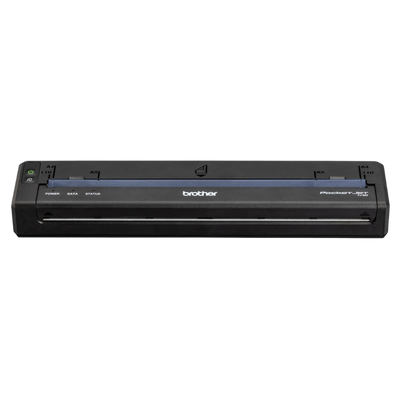
E-citation hardware gives law enforcement agencies, police departments, sheriff departments, public safety organizations, parking enforcement teams, code enforcement departments, inspectors, field service organizations, route operations, and government fleets the mobile technology needed to create, process, and print documents away from a traditional office. A complete electronic citation deployment can combine a rugged mobile computer or tablet, e-citation software, a full-page mobile thermal printer, vehicle mounting hardware, mobile power, wireless connectivity, barcode scanning, document media, and deployment accessories into one field-ready system.
Spartan POS supplies e-citation printers, law enforcement mobile printers, police vehicle printers, Brother PocketJet 8 mobile printers, rugged mobile computers, barcode scanning hardware, vehicle mounting solutions, mobile printer power accessories, full-page thermal paper, and field mobility hardware for agencies that need dependable document printing from patrol cars, inspection vehicles, service trucks, mobile offices, and other field-based environments.
Quick Answer: An e-citation hardware system typically combines an electronic citation application with a mobile computer, tablet, or rugged handheld and a compact mobile printer capable of producing readable field documents. The Brother PocketJet 8 PJ862 is a strong option for mobile full-page printing because it combines full-width direct thermal printing with USB-C and Bluetooth connectivity. Vehicle-based deployments can also add mounting hardware, vehicle power, batteries, protective cases, and compatible thermal paper. Always confirm the exact printer model, operating system, e-citation application, connectivity method, mount, power configuration, and media requirements before deployment.
Best For
E-citation and mobile document printing systems are designed for organizations whose employees create official documents, forms, notices, reports, citations, invoices, or other paperwork while working in the field.
- Police departments and municipal law enforcement agencies
- Sheriff departments, highway patrol, and traffic enforcement units
- Parking enforcement and municipal citation operations
- Public safety agencies and government vehicle fleets
- Code enforcement officers and building inspectors
- Fire inspection and public safety inspection teams
- Utility field crews and public works departments
- Field service technicians and mobile repair organizations
- Route sales, transportation, logistics, and proof-of-delivery workflows
- Mobile government offices and field documentation teams
- Commercial vehicle inspection and transportation enforcement
- Organizations replacing handwritten citation and field-form processes
What Is E-Citation Hardware?
E-citation hardware refers to the physical technology used with electronic citation software to capture information, process a citation or field document, and produce the required printed output. Instead of manually completing a handwritten ticket and later re-entering information into another system, an electronic citation workflow can allow an officer or field employee to enter information digitally and print the completed document at the point of activity.
The exact configuration depends on the agency, software platform, form requirements, operating system, and vehicle environment. A typical electronic citation hardware system may include:
- Rugged tablet, laptop, mobile computer, or handheld device
- E-citation or electronic ticketing software
- Brother PocketJet 8 full-page mobile printer
- Vehicle printer mount or console mounting hardware
- Vehicle power adapter or hardwired power solution
- Rechargeable mobile printer battery
- USB-C, Bluetooth, Wi-Fi, or other supported connectivity
- Full-page direct thermal paper
- Continuous roll, fanfold, or cut-sheet thermal media
- Protective printer case
- 2D barcode scanner or scanner-equipped mobile computer
- Vehicle charging accessories
- Field mobility mounting and cable-management hardware
Why Use Electronic Citations Instead of Handwritten Tickets?
Traditional handwritten citation workflows can require officers to manually copy information from a driver's license, registration, vehicle record, or other source onto a paper form. That information may later need to be entered again into a records, court, or administrative system.
An electronic citation system is designed to move more of that workflow into the field. Depending on the software and agency configuration, officers may be able to enter or scan data on a mobile device, verify the information electronically, generate the citation, and print the document from a mobile printer inside the patrol vehicle.
- Reduce dependence on handwritten citation forms
- Improve legibility of printed citations and field documents
- Standardize document formatting across officers and vehicles
- Support digital workflows from patrol cars and mobile workstations
- Print citations and warnings at the roadside
- Produce reports and other full-page documents from the same printer
- Reduce the need for ink cartridges or toner in mobile vehicles
- Create a repeatable hardware configuration across fleet vehicles
Brother PocketJet 8 for E-Citation Printing
The Brother PocketJet 8 family is well suited to e-citation and mobile field-document workflows because it provides full-page direct thermal printing in a compact mobile form factor. Unlike a narrow receipt printer, PocketJet printers are designed to produce full-width documents such as citations, forms, reports, invoices, inspection documents, agreements, and other paperwork that would traditionally be printed on a desktop office printer.
Direct thermal printing eliminates the need to carry ink cartridges, toner cartridges, or printer ribbons in a patrol vehicle or service truck. The printer uses compatible thermal media to create the image directly on the paper.
Depending on the PocketJet 8 model selected, connectivity can include USB-C, Bluetooth, and Wi-Fi. This makes it possible to configure a mobile citation printer around laptops, rugged tablets, mobile computers, compatible smartphones, or other supported field devices.
PocketJet 8 printers can also be paired with vehicle power, rechargeable batteries, protective cases, vehicle mounts, fanfold paper, roll paper, and cut-sheet thermal paper to create a complete mobile printing platform.
Complete E-Citation Hardware Setup
A reliable electronic citation deployment is more than a printer. The complete system should be planned around the software, officer device, printer, vehicle, mounting position, connectivity, power source, and document media.
| Component | Role in the E-Citation System | What to Confirm |
|---|---|---|
| E-Citation Software | Creates and manages electronic citations, warnings, forms, or related digital records. | Supported operating systems, printer support, form format, required drivers, wireless support, and agency integration. |
| Mobile Computer or Tablet | Provides the officer or field employee interface for entering, reviewing, scanning, and submitting information. | Android, iOS, Windows, wireless requirements, ruggedness, barcode scanning, charging, and application support. |
| Brother PocketJet 8 Mobile Printer | Prints full-page citations, warnings, forms, reports, notices, and other field documents. | PocketJet model, print resolution, USB-C, Bluetooth, Wi-Fi, battery requirements, and paper configuration. |
| Vehicle Printer Mount | Secures the mobile printer inside a patrol car, inspection vehicle, service truck, or other fleet vehicle. | Vehicle layout, console location, printer model, paper path, officer access, and available installation space. |
| Vehicle Power | Powers or charges the printer during mobile operation. | Cigarette-plug adapter, wired power, USB-C charging, vehicle voltage, cable routing, and upfitter requirements. |
| Rechargeable Battery | Allows the printer to operate away from fixed vehicle or AC power. | Exact PocketJet model, battery SKU, charging method, operating requirements, and spare-battery policy. |
| Thermal Paper | Provides the printable media used for citations and field documents. | Cut sheet, fanfold, continuous roll, document size, archive requirements, and printer compatibility. |
| Protective Case | Protects the printer during portable use outside the vehicle. | Printer model, battery configuration, paper feed, carrying requirements, and field environment. |
| Barcode Scanning | Supports barcode and 2D code capture within compatible electronic citation or inspection workflows. | Required symbologies, integrated vs. separate scanner, software support, and mobile device configuration. |
Complete PocketJet 8 Model Setup
Brother offers several PocketJet 8 configurations. The correct model depends primarily on print resolution, connectivity requirements, and whether the printer will be permanently installed in a vehicle or used as a portable field printer.
| Brother PocketJet 8 Model | Resolution | Connectivity | Typical Configuration | Best Fit |
|---|---|---|---|---|
| PJ822 | 203 DPI class | USB-C | Printer only | Basic mobile forms, field service documents, laptop printing, and straightforward wired deployments. |
| PJ822-VK | 203 DPI class | USB-C | Vehicle-oriented configuration | Patrol vehicles, inspectors, fleet deployments, public works, utilities, and vehicle upfitters. |
| PJ823 | 300 DPI | USB-C | High-resolution printer | Detailed forms, fine text, diagrams, contracts, inspection documentation, and higher-resolution output. |
| PJ823-VK | 300 DPI | USB-C | High-resolution vehicle configuration | Government fleets, inspectors, mobile offices, and field applications requiring higher-resolution vehicle printing. |
| PJ862 | 203 DPI class | USB-C + Bluetooth | Wireless mobile printer | E-citation, law enforcement, inspection, field service, and mobile Bluetooth workflows. |
| PJ863 | 300 DPI | USB-C + Bluetooth | High-resolution wireless printer | Detailed wireless field forms, contracts, inspections, insurance documents, and mobile reports. |
| PJ883 | 300 DPI | USB-C + Bluetooth + Wi-Fi | Premium connectivity model | Enterprise fleets, multi-device deployments, mobile offices, network printing, and environments requiring maximum connectivity flexibility. |
Police E-Citation Hardware
Police e-citation hardware is typically installed or carried as part of a mobile patrol workstation. An officer may use a rugged laptop, tablet, or handheld device to enter information and then print the completed traffic citation, warning, report, or other document from a compact printer mounted in the vehicle.
The printer needs to fit within a limited patrol-car interior without interfering with other equipment. The mount should provide secure printer placement while maintaining access to the paper path, controls, cables, power connection, and printed document.
Agencies should consider the full vehicle installation instead of choosing the printer independently. A deployment may involve:
- Mobile data computer or rugged tablet
- Electronic citation software
- Brother PocketJet 8 printer
- Vehicle console or printer mounting bracket
- Hardwired or plug-in vehicle power
- USB-C or wireless printer connection
- Thermal citation paper
- Spare paper stored inside the patrol vehicle
- Protective printer case for portable operation
- Battery for printing away from the vehicle
- Vehicle docking and charging equipment
Traffic Citation Printers
A traffic citation printer needs to produce clear, readable documents without adding unnecessary bulk to the patrol vehicle. Unlike a traditional desktop laser or inkjet printer, a mobile direct thermal printer does not require toner or liquid ink.
This is particularly useful in law enforcement vehicles because officers do not need to maintain ink cartridges in environments exposed to temperature changes, vibration, movement, and constant daily vehicle use.
PocketJet's full-page format is also important. Traffic citations, crash forms, warnings, court documents, inspection reports, and other agency forms may require substantially more printable area than a narrow receipt-style mobile printer can provide.
Vehicle-Mounted E-Citation Printers
A vehicle-mounted e-citation printer turns the patrol car, code enforcement vehicle, utility truck, or inspection vehicle into a mobile document workstation. Mounting the printer helps keep equipment organized and can make the printer easier to access during repeated field use.
Vehicle installations should be planned around ergonomics and the existing console layout. Police vehicles may already contain radios, rugged laptops, docking stations, cameras, lighting controls, scanners, networking equipment, and other public safety electronics.
Before choosing a printer mount, confirm:
- Exact PocketJet model
- Vehicle make and interior configuration
- Console or mounting system already installed
- Printer orientation
- Paper loading method
- Access to USB-C and power connectors
- Clearance for printed documents
- Officer reach and visibility
- Cable routing requirements
- Vehicle upfitter requirements
Mobile E-Citation Printing Without Ink or Toner
Brother PocketJet printers use direct thermal printing. That means the image is produced on compatible thermal media without ink, toner, or a thermal transfer ribbon.
For mobile fleets, removing ink and toner from the workflow can simplify supplies. Agencies still need to manage compatible thermal paper, printer power, batteries where required, and replacement accessories, but there is no ink cartridge or toner cartridge to replace.
Direct thermal mobile printing is useful for:
- Traffic citations
- Written warnings
- Parking citations
- Inspection reports
- Compliance notices
- Roadside forms
- Crash documentation
- Incident paperwork
- Field service invoices
- Work orders
- Proof-of-delivery documents
- Route paperwork
Bluetooth E-Citation Printers
A Bluetooth e-citation printer can reduce the need for a physical printer data cable between the mobile computing device and the printer. Models such as the Brother PocketJet PJ862 and PJ863 provide Bluetooth in addition to USB-C connectivity.
Bluetooth can be valuable for rugged tablets, mobile computers, and handheld devices where the field workflow benefits from wireless printer communication.
Wireless compatibility should still be confirmed with the specific e-citation application and operating system. The presence of Bluetooth on both devices does not automatically guarantee that a particular application supports the required printer workflow.
Wi-Fi E-Citation and Mobile Document Printing
The Brother PocketJet PJ883 adds Wi-Fi capability to a platform that also supports USB-C and Bluetooth. Wi-Fi can be useful for deployments where multiple devices, network-based printing, or broader wireless flexibility are part of the field mobility strategy.
Agencies considering Wi-Fi should evaluate how printers will join the network, whether printing occurs through a vehicle network or another wireless environment, and how printer configuration will be managed across the fleet.
Full-Page Mobile Printers for Law Enforcement
One of the major distinctions between PocketJet and many other mobile printers is its ability to produce full-width documents. A full-page mobile printer for law enforcement can support more than traffic tickets.
The same printer platform can potentially be used for:
- Electronic traffic citations
- Warnings
- Crash and accident forms
- Incident reports
- Vehicle inspection forms
- Commercial vehicle documentation
- Court-related documents
- Witness or field forms
- Property paperwork
- Compliance notices
- Government forms
- Roadside documentation
That allows agencies to consider one mobile printer platform for multiple document workflows rather than deploying a separate printer for every form type.
Mobile Computers for E-Citation
The printer is only one component of an e-citation mobile computing system. Officers and field workers also need a device capable of running the required application, displaying forms, accepting data entry, communicating with agency systems, and connecting to the printer.
Depending on the application, agencies may use rugged laptops, tablets, Android mobile computers, handheld barcode terminals, or other supported devices.
Enterprise mobile computers can also combine data capture functions into one handheld platform. Depending on the model, capabilities may include:
- 2D barcode scanning
- Touchscreen data entry
- Android operating system
- Wi-Fi connectivity
- Cellular connectivity
- Camera capture
- GPS and location services
- Digital forms
- Signature capture
- Ruggedized construction
Barcode Scanning for Electronic Citation Workflows
Barcode scanning can be part of an electronic citation or field-inspection workflow when the software supports data capture from printed or encoded information. A rugged mobile computer with an integrated 2D imager can reduce the need to carry a separate handheld scanner.
Before selecting a scanner or scan-enabled mobile computer, identify which barcode formats the application needs to read, whether the data is presented on physical documents or digital screens, and whether the scanning workflow is supported directly inside the e-citation software.
Common E-Citation and Field Applications
The same mobile computing and full-page printing platform can support a broad range of public safety, government, field service, transportation, and route-based workflows.
Law Enforcement & E-Citation
Create and print traffic citations, warnings, crash forms, incident documentation, roadside forms, and other field paperwork from a patrol vehicle or mobile workstation.
Parking Enforcement
Support electronic parking citations, municipal violation notices, warnings, field records, and other parking enforcement documentation.
Code Enforcement & Inspections
Print code enforcement notices, inspection reports, compliance documents, permits, correction notices, and field forms at the inspection location.
Public Works & Utilities
Produce service notices, work documentation, inspection records, meter forms, maintenance reports, and customer documents from utility and public works vehicles.
Field Service
Print invoices, work orders, repair summaries, service agreements, customer documents, and completed field-service forms at the job site.
Route Sales & Delivery
Create invoices, manifests, delivery paperwork, proof-of-delivery documents, route forms, customer receipts, and other mobile documents.
Transportation & Fleet Operations
Support vehicle inspection paperwork, transport forms, route documents, compliance records, fleet reports, and other mobile transportation documentation.
Government Mobile Offices
Give inspectors, investigators, government employees, and mobile teams the ability to create and print full-page documents without returning to a fixed office.
Fire & Safety Inspections
Print inspection reports, notices, compliance documentation, corrective action forms, and other field records during safety inspections.
Healthcare & Mobile Services
Mobile service organizations can use full-page field printing for authorization forms, visit summaries, patient paperwork, service documentation, and other supported mobile workflows.
Thermal Paper for E-Citation Printers
The thermal paper is an important part of a PocketJet deployment. The paper must be compatible with the direct thermal print process and with the printer's intended feeding method.
PocketJet deployments can use different media configurations depending on the application, including cut sheets, fanfold media, continuous rolls, perforated roll media, and selected full-width label media.
The correct media choice depends on how the citation or field form is designed, where the printer is installed, how paper is stored, and how long the printed document needs to remain readable.
Fanfold Paper for Police Citation Printers
Fanfold thermal paper can be useful in vehicle deployments because a supply of folded sheets can be positioned near the printer and fed into the mobile printing system. This can support repeated full-page printing without requiring officers to manually insert an individual sheet before every document.
Fanfold paper configuration should account for storage space, paper routing, printer orientation, mounting hardware, and the overall vehicle console design.
Roll Paper for Vehicle Mobile Printers
Roll-paper systems offer another option for vehicle mobile printing. Depending on the installation, roll media may help support continuous access to paper while keeping the media organized as part of the mounted printer system.
Confirm the specific roll holder, mount, paper dimensions, and printer compatibility before selecting this configuration.
Portable E-Citation Printing Outside the Vehicle
Not every citation, inspection, or field document is created from inside a vehicle. Adding a rechargeable battery and protective carrying case can support printing away from fixed vehicle power.
Portable operation can be useful for inspectors, code enforcement officers, accident-scene documentation, mobile service workers, and other employees who need to carry the printer to the work location.
Vehicle Power for PocketJet 8 Printers
Vehicle power is a key component in permanent mobile installations. A printer that is used throughout a shift needs a dependable method of receiving power or maintaining battery charge.
PocketJet vehicle deployments can use vehicle power adapters and wired vehicle power configurations. The correct choice depends on the printer model, vehicle, console installation, fleet standards, and upfitter requirements.
Fleet planners should determine whether they want:
- Plug-in vehicle power
- Hardwired vehicle power
- USB-C charging
- Rechargeable battery operation
- Combination vehicle power and battery backup
- Spare batteries for field use
Brother PocketJet Vehicle Mounting
A professional Brother PocketJet vehicle mount can secure the printer during vehicle movement and keep it positioned as part of the officer's or technician's mobile workstation.
Mobile printer mounting is commonly considered for:
- Police patrol cars
- Sheriff vehicles
- Highway patrol vehicles
- Parking enforcement vehicles
- Inspection vehicles
- Utility trucks
- Public works fleets
- Field service vans
- Delivery vehicles
- Transportation fleets
Interface and Configuration Notes
A successful e-citation deployment depends on the complete hardware and software configuration. Selecting a PocketJet printer solely by model name is not enough.
- Confirm which e-citation or field application will be used
- Confirm the operating system used by the officer or field device
- Determine whether the workflow requires USB-C, Bluetooth, Wi-Fi, or multiple interfaces
- Select 203 DPI class or 300 DPI output based on document requirements
- Confirm whether the printer will be permanently mounted or carried between locations
- Determine whether the printer requires a rechargeable battery
- Confirm vehicle power and charging requirements
- Choose the correct printer mounting solution
- Confirm cut-sheet, fanfold, or roll-paper requirements
- Verify the thermal paper size and document format
- Confirm printer-driver or mobile SDK requirements with the application
- Verify Bluetooth or Wi-Fi support inside the actual e-citation application
- Confirm vehicle upfitter requirements before ordering mounting hardware
- Determine how paper will be stored and fed inside the vehicle
- Identify whether printing is required outside the vehicle
- Plan for spare batteries, power adapters, cables, and paper for fleet deployments
- Standardize part numbers across vehicles whenever practical
- Test the complete software, device, printer, and media workflow before fleet-wide deployment
What You May Need
A complete electronic citation system may require additional field mobility hardware, printer accessories, paper, mounting components, or data-capture equipment.
- Brother PocketJet 8 PJ862 Mobile Printer for Bluetooth and USB-C full-page mobile printing.
- Brother PocketJet 8 Printers for full-page mobile citation, report, inspection, and field-document printing.
- PocketJet Vehicle Mounts for securing mobile printers in patrol cars, inspection vehicles, service trucks, and other fleet environments.
- PocketJet Batteries for portable printing away from fixed vehicle or AC power.
- PocketJet Vehicle Power Accessories for installed fleet and mobile workstation configurations.
- PocketJet Thermal Paper for citations, reports, field forms, inspection documents, and full-page mobile printing.
- Mobile Computers for e-citation, inspections, field service, barcode capture, route operations, and mobile data collection.
- Barcode Scanners for compatible field data-capture and verification workflows.
- Brother RuggedJet Mobile Printers for narrower mobile receipts, labels, tickets, tags, and field printing applications.
Brother PocketJet vs. RuggedJet for E-Citation
Brother PocketJet and Brother RuggedJet are both mobile printer families, but they serve different output requirements.
PocketJet is the stronger fit when the application requires full-width forms, reports, citations, agreements, invoices, or other letter-style documents. That makes it especially useful for law enforcement, mobile offices, inspections, and field service documentation.
RuggedJet mobile printers are available in narrower print widths and are well suited to receipts, labels, tickets, barcode labels, route documentation, mobile tags, and other compact output.
The correct choice should be driven by the actual document width and media format required by the software—not simply by which mobile printer is smaller.
Compatibility Notes
E-citation printer compatibility must be confirmed before purchase. A PocketJet printer may provide USB-C, Bluetooth, or Wi-Fi hardware, but the e-citation software must also support the operating system, printer driver, wireless method, document format, and printing workflow being used.
Compatibility can depend on the exact:
- E-citation software vendor
- Application version
- Printer model
- Printer firmware
- Officer mobile computer
- Tablet or rugged laptop
- Android, iOS, Windows, macOS, or other supported operating environment
- USB-C connection
- Bluetooth connection
- Wi-Fi configuration
- Printer driver
- Mobile print service or SDK
- Document dimensions
- Thermal paper type
- Vehicle mount
- Vehicle power configuration
- Battery
- Cable part number
Spartan POS can help review the hardware portion of the deployment and match the printer, connectivity, paper, battery, power, and mounting configuration to the requirements provided by your e-citation software vendor or system integrator.
Replacement and Upgrade Notes
Agencies replacing older mobile citation printers should document the existing installation before ordering new equipment. A printer replacement can affect mounting hardware, power cables, paper configuration, connectivity, and software settings even when the new device serves the same basic purpose.
- What mobile printer model is currently installed?
- What e-citation application is currently being used?
- What operating system runs on the officer's mobile device?
- Is the current printer connected by USB, Bluetooth, Wi-Fi, or another interface?
- Does the current vehicle installation use a dedicated printer mount?
- Is the existing printer powered by the vehicle or by a rechargeable battery?
- What paper format is currently used for citations?
- Does the agency use cut-sheet, fanfold, or roll thermal paper?
- Does the new printer need to fit an existing console or mount?
- Will the existing vehicle power cable work with the replacement printer?
- Are officers printing citations only or additional reports and forms?
- Does the agency require 300 DPI for fine text, diagrams, or detailed forms?
- Does the replacement system require Bluetooth or Wi-Fi?
- Will printers be permanently assigned to vehicles or shared between users?
- How many fleet vehicles are being upgraded?
- Should spare printers, batteries, mounts, cables, and paper be included?
Fleet Standardization for E-Citation Hardware
Law enforcement agencies and field organizations deploying printers across multiple vehicles can benefit from standardizing the hardware configuration. Using the same printer model, mount, power cable, paper, battery, and connectivity method across the fleet can simplify support and replacement.
Standardization can also make it easier for fleet managers, IT personnel, public safety technology teams, and vehicle upfitters to maintain consistent installation documentation.
A standardized fleet configuration may define:
- Approved PocketJet model
- Approved printer mount
- Vehicle power cable
- Battery configuration
- Approved thermal paper
- USB-C cable
- Bluetooth pairing procedure
- Wi-Fi configuration where applicable
- Driver package
- Printer naming convention
- Spare equipment inventory
- Vehicle installation procedure
E-Citation Hardware for New Patrol Vehicles
When outfitting new patrol vehicles, the mobile printer should be planned at the same time as the rugged computer, tablet dock, radio equipment, console, networking, cameras, and other vehicle electronics.
Waiting until the rest of the console is installed can create mounting or cable-routing challenges. The printer needs adequate space for the device, paper, printed document path, connectors, and officer access.
Agencies and vehicle upfitters should determine the exact printer and mount configuration before finalizing the console whenever possible.
E-Citation Hardware for Public Safety IT Departments
Public safety IT teams need to consider more than physical printer installation. The printer becomes part of a larger mobile technology environment that can include mobile data computers, tablets, vehicle networking, VPN connectivity, device management, e-citation applications, records systems, court systems, scanners, cameras, and other field technology.
Before approving a printer model for fleet use, IT teams should validate:
- Operating-system compatibility
- Application support
- Printer driver deployment
- Bluetooth pairing process
- Wi-Fi configuration where applicable
- Device naming and identification
- Firmware management
- Test citation formatting
- Paper and media handling
- Support procedures
- Replacement printer provisioning
Why Buy E-Citation Hardware From Spartan POS?
Spartan POS supplies commercial mobile printers, barcode hardware, mobile computers, thermal media, and related field technology for professional deployments. That makes it possible to source more of the e-citation hardware stack from one supplier instead of treating the printer, mobile computer, accessories, and supplies as unrelated purchases.
- Brother PocketJet 8 mobile printer expertise
- E-citation printer configuration assistance
- Law enforcement and public safety mobile printing hardware
- Vehicle-ready mobile printer configurations
- Vehicle printer mounting solutions
- Vehicle power and charging accessories
- Rechargeable mobile printer batteries
- PocketJet thermal paper and media
- Rugged mobile computers
- Barcode scanning hardware
- Field service and route hardware
- Fleet hardware standardization
- Multi-unit purchasing and deployment planning
- Replacement mobile printer sourcing
- Compatibility review based on application requirements
Frequently Asked Questions
What is an e-citation system?
An e-citation system uses software and mobile hardware to create and process citations electronically instead of relying entirely on handwritten paper forms. A complete system may include a rugged computer or tablet, e-citation software, mobile printer, vehicle mount, power accessories, thermal paper, and related data-capture hardware.
What is an e-citation printer?
An e-citation printer is a mobile printer used to produce the physical citation, warning, report, or related document generated by electronic citation software. Full-page thermal printers such as the Brother PocketJet 8 are commonly suited to workflows requiring full-width forms.
What printer is good for police e-citation?
The Brother PocketJet 8 family is a strong option for police and public safety mobile printing because it provides compact full-page direct thermal printing with model options for USB-C, Bluetooth, and Wi-Fi connectivity. The exact model should be matched to the agency's e-citation application and mobile device.
Can the Brother PocketJet 8 print traffic citations?
Yes, PocketJet 8 printers can be used in electronic citation and law enforcement mobile-printing workflows when the printer model, software, document format, operating system, connectivity, and thermal media are configured correctly.
Does the PocketJet 8 require ink?
No. PocketJet uses direct thermal printing and therefore does not require ink cartridges, toner cartridges, or thermal transfer ribbons. It does require compatible direct thermal paper.
Can a PocketJet printer be mounted in a police vehicle?
Yes. Vehicle mounting solutions are available for PocketJet mobile printer deployments. The exact mount should be selected around the printer model, patrol vehicle, console, available installation space, paper configuration, and upfitter requirements.
Can a PocketJet printer run from vehicle power?
Vehicle power accessories are available for PocketJet mobile printing deployments. The exact adapter or hardwired solution should be confirmed for the selected printer and vehicle installation.
Can the PocketJet 8 run on a battery?
PocketJet configurations can support rechargeable battery operation, depending on the model and accessory package. Battery operation is useful when officers, inspectors, or field workers need to print away from fixed vehicle power.
Which PocketJet 8 models have Bluetooth?
PocketJet 8 models such as the PJ862 and PJ863 include Bluetooth in addition to USB-C. Confirm the exact model and software support before building a Bluetooth e-citation workflow.
Which PocketJet 8 model has Wi-Fi?
The PocketJet PJ883 provides Wi-Fi along with Bluetooth and USB-C connectivity, making it a flexible choice for more complex mobile and multi-device environments.
Should I choose 203 DPI or 300 DPI for e-citation?
The correct resolution depends on the document. Standard-resolution output can be suitable for many citation and field-document workflows. Higher 300 DPI output may be preferred when forms contain smaller text, detailed graphics, diagrams, fine lines, signatures, or dense information.
What type of paper does the Brother PocketJet use?
PocketJet printers use compatible direct thermal media. Depending on the deployment, media can include cut-sheet, fanfold, continuous roll, or other supported PocketJet thermal paper configurations.
Is fanfold paper good for e-citation?
Fanfold thermal paper can work well for vehicle-based citation printing because multiple sheets can be stored and fed as part of a mobile printing setup. The paper storage and feed path should be planned with the vehicle mount and console.
Can officers print documents other than tickets?
Yes. A full-page PocketJet mobile printer can support many document types, including citations, warnings, reports, inspection forms, invoices, agreements, service forms, and other full-page field documents, depending on the application.
Can e-citation hardware use a rugged tablet?
Yes, many electronic citation and field workflows use rugged tablets, laptops, or enterprise mobile computers. The mobile device must support the e-citation software and the selected printer connection method.
Can e-citation hardware use an Android mobile computer?
Android enterprise mobile computers can be considered for e-citation, inspection, route, and field-service workflows when the specific software application supports the device and printer configuration.
Do I need a barcode scanner for e-citation?
That depends on the application. Some workflows may use barcode or 2D code capture to reduce manual data entry. A rugged mobile computer with an integrated scanner can sometimes combine mobile computing and barcode capture in one device.
What hardware is needed inside a police vehicle?
A mobile e-citation installation may include a rugged computer or tablet, e-citation software, full-page mobile printer, printer mount, vehicle power, thermal paper, data connection, battery, and other vehicle computing accessories. Exact requirements vary by agency and software.
Can Spartan POS supply a complete e-citation printer kit?
Spartan POS can help assemble mobile printing configurations around Brother PocketJet 8 printers, vehicle mounting, power, batteries, thermal media, mobile computers, and related field hardware. The final configuration should be reviewed against the agency's specific e-citation software requirements.
Can Spartan POS support fleet deployments?
Yes. Agencies deploying hardware across multiple vehicles can discuss standardized printer models, mounts, power accessories, paper, spare equipment, and multi-unit purchasing requirements with Spartan POS.
Can I replace an older mobile citation printer with PocketJet 8?
Possibly. Before replacing an existing mobile printer, compare the old printer's connection method, mount, vehicle power, paper format, operating system, software support, and document dimensions with the proposed PocketJet 8 configuration.
Do PocketJet vehicle kits all include the same accessories?
No. Kit contents can vary by manufacturer or distributor SKU. Confirm the exact included mount, battery, power cable, USB cable, paper, and other accessories before ordering a vehicle-kit configuration.
Is PocketJet a receipt printer?
PocketJet is primarily a full-page mobile document printer rather than a traditional narrow POS receipt printer. That wider format is one reason it is well suited to citations, reports, forms, invoices, inspections, and mobile office documents.
Can PocketJet be used for field service?
Yes. In addition to e-citation and public safety, PocketJet full-page mobile printers can support field service invoices, work orders, repair summaries, service agreements, inspection forms, and customer documentation.
Can PocketJet be used for route delivery?
Yes. Mobile full-page printing can support route invoices, manifests, proof-of-delivery forms, customer paperwork, and other transportation or delivery documentation.
Can PocketJet be used by code enforcement officers?
Yes. Code enforcement and inspection teams can use full-page mobile printing for notices, inspection reports, compliance documents, corrective-action forms, and other field paperwork when supported by their software.
How do I choose the right e-citation printer?
Start with the software and document requirements. Identify the operating system, required paper width, resolution, connection method, vehicle installation, power source, mounting needs, portable-printing requirements, and fleet size. Then choose the printer model and accessories that match those requirements.
Should we standardize e-citation printers across the fleet?
Standardization can simplify installation, training, replacement hardware, spare accessories, thermal paper purchasing, IT support, and future fleet expansion. Agencies should test and approve a complete configuration before deploying it broadly.
Can Spartan POS verify our e-citation software?
Spartan POS can help review hardware requirements and compare the selected printer, connectivity, media, mount, battery, and power configuration with specifications provided by the software vendor. Final application support should always be confirmed for the exact e-citation software and version.
Bottom Line
A successful e-citation hardware deployment brings software, mobile computing, printing, vehicle mounting, power, connectivity, and thermal media together into one field-ready workflow.
For law enforcement agencies, sheriff departments, highway patrol, municipal police, parking enforcement, code enforcement, public safety, utilities, inspectors, and other mobile workforces, the Brother PocketJet 8 provides a compact way to produce full-page documents directly from a patrol vehicle, mobile office, service truck, inspection site, or roadside location.
The correct configuration may include a Brother PJ822, PJ823, PJ862, PJ863, or PJ883 mobile printer, vehicle mounting hardware, vehicle power, rechargeable battery, thermal paper, rugged mobile computer, barcode scanning capability, and the connection method required by the field software.
Spartan POS can help organizations source electronic citation printers, police mobile printers, traffic citation printers, vehicle-mounted thermal printers, Brother PocketJet 8 hardware, mobile computers, printer mounts, batteries, power accessories, thermal paper, and related field mobility equipment.