
Find the Best POS System for Your Small Business
The best point-of-sale system is not simply the cheapest register or the most popular app. It is the combination of software, checkout hardware, inventory tools, payment workflow, support, and expansion options that fit the way your business actually operates.
Quick POS Recommendation
Simple checkout: Start with dependable core hardware and software that is easy to operate.
Inventory-heavy retail: Prioritize barcode scanning, receiving, inventory reporting, label printing, and item control.
Food service: Prioritize order entry, kitchen printing, payment workflow, and reliable receipt printing.
Growing business: Choose a system that can expand into additional lanes, employees, inventory workflows, and locations.
Explore a Full POS SystemWhat Makes a POS System Good for a Small Business?
A strong small-business POS system should make everyday work easier without boxing the business into a setup that becomes difficult to expand later.
Best POS System by Small Business Type
Start with the way your business sells. A boutique, liquor store, convenience store, grocery market, restaurant, and service counter may all use a POS system, but they do not have the same operational requirements.
Retail Store POS
Best for boutiques, specialty stores, gift shops, apparel, sporting goods, hardware stores, and general retail.
- Barcode scanning
- Item and price management
- Inventory tracking
- Receipt printing
- Cash management
- Sales reporting
Restaurant & Café POS
Restaurants need a system designed around orders and food-service workflows rather than only product scanning.
- Order entry
- Kitchen ticket printing
- Receipt printing
- Employee workflows
- Payment handling
- Reliable commercial hardware
Liquor Store POS
Liquor retailers often have high SKU counts, age-restricted sales, bottle-pack-case relationships, and deeper inventory requirements.
- Barcode-based checkout
- Inventory control
- Age-related workflows
- Employee controls
- Reporting
- Multi-store expansion options
Convenience Store POS
Convenience stores depend on fast transactions and must manage many small, fast-moving items.
- Fast barcode scanning
- Reliable receipt printing
- Restricted-item workflows
- Employee permissions
- Inventory reporting
- Cash drawer control
Grocery & Food Market POS
Small grocery stores and specialty food markets may require scanning, inventory, labels, cash handling, and specialized checkout hardware.
- Barcode scanning
- Inventory management
- Receipt printers
- Label printing
- Cash drawers
- Scale-related workflows when required
Mobile & Service Business POS
Field service, delivery, events, and mobile selling may benefit from a smaller hardware footprint and portable printing.
- Mobile checkout
- Bluetooth or wireless connections
- Portable receipt printing
- Compact hardware
- Customer transaction records
- Flexible deployment
Find POS Hardware for Your Business
Already know the brand, model, connection type, or hardware category you need? Search Spartan POS directly.
What POS Hardware Does a Small Business Need?
Your exact hardware depends on the software and workflow, but most commercial checkout stations are built from a combination of the components below.
| POS Component | What It Does | Who Usually Needs It | Shop / Learn More |
|---|---|---|---|
| POS Terminal or Computer | Runs the POS software and acts as the primary checkout workstation. | Most fixed checkout environments. | Complete POS Systems |
| Barcode Scanner | Scans UPC, product, inventory, and other supported barcodes. | Retail, liquor, grocery, convenience, warehouse, and inventory-focused businesses. | Shop Barcode Scanners |
| Receipt Printer | Prints customer receipts or other POS-generated tickets. | Retail, restaurants, service counters, and businesses offering printed receipts. | Shop Receipt Printers |
| Cash Drawer | Stores cash and may open automatically through the POS or receipt printer. | Businesses that accept cash. | Shop Cash Drawers |
| Barcode Label Printer | Prints product, shelf, price, inventory, asset, and other barcode labels. | Businesses that create their own product or inventory labels. | Shop Barcode Printing |
| Mobile Printer | Provides portable receipt or label printing for mobile workflows. | Delivery, field service, mobile checkout, events, and portable operations. | Shop Mobile Printers |
Compatibility Comes Before Brand or Price
Compatibility depends on your POS software, operating system, connection type, drivers, accessories, and configuration. Confirm compatibility before ordering.
For example, two receipt printers can look almost identical while using different USB, Ethernet, serial, Bluetooth, or wireless configurations. Cash drawers can also require the correct interface or printer connection. Choosing the right configuration matters just as much as choosing the right brand.
Read the POS Hardware Buying Guide →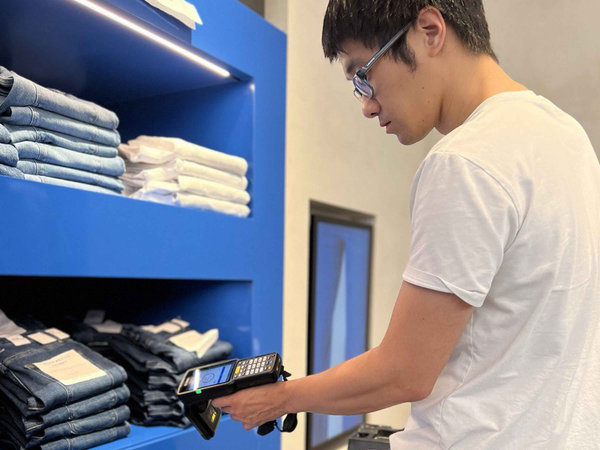
Do You Need a Complete POS System or Just Hardware?
There are two common buying situations.
1. You Need a Complete New POS System
If you are opening a business, replacing an older register, or changing POS software, it usually makes sense to plan the system as a complete stack. That can include the POS workstation, software, receipt printer, cash drawer, scanner, accessories, and other workflow-specific hardware.
Shop Complete Retail POS Systems →
2. You Already Have POS Software
If your software is already selected, shop around that software's supported hardware. The exact printer interface, scanner connection, cash drawer cable, driver, operating system, or accessory can determine whether the hardware will work correctly.
Small Business POS Inventory Management
For inventory-based businesses, checkout is only one part of the POS decision. A system should also help create a practical workflow for receiving merchandise, maintaining items, counting inventory, identifying fast sellers, and reordering products.
Barcode Scanning
Scanning products can speed checkout and reduce manual item entry. Businesses may need 1D scanners, 2D scanners, presentation scanners, wireless scanners, or rugged devices depending on the environment.
Compare Barcode Scanners →Barcode Label Printing
If products arrive without usable barcodes, a label printer can help create internal product labels, shelf labels, price labels, inventory labels, and other identification.
Shop Barcode Label Printers →Inventory-Focused POS Software
Growing retailers should evaluate how the software handles items, stock levels, receiving, reporting, purchase workflows, and multi-location needs rather than focusing only on payment acceptance.
Explore POS Inventory Management →Small Retail Store POS: A Practical Setup
A typical small retail store may start with a commercial POS workstation, receipt printer, cash drawer, barcode scanner, and POS software. Stores that print their own product labels may also add a desktop barcode label printer.
Instead of purchasing every component independently, a preplanned POS hardware package can simplify the buying process when the included hardware matches your software requirements.

Best POS Features for a Growing Small Business
Features Worth Prioritizing
- Fast and dependable checkout
- Easy item and price management
- Barcode scanning
- Inventory reporting
- Employee logins and permissions
- Sales reporting
- Cash management
- Compatible receipt printing
- Support for the hardware you actually use
- Ability to add locations or stations when needed
Features That Sound Good but Need More Questions
- "Works with everything" without a compatibility list
- "Free POS" without understanding processing or subscription requirements
- "Wireless" without confirming Bluetooth, Wi-Fi, or network requirements
- "Universal printer" without confirming software and interface support
- "Inventory included" without reviewing receiving, counts, reporting, and item workflows
- "Easy setup" without understanding configuration, drivers, networking, and peripherals
How Much Does a Small Business POS System Cost?
POS cost depends on how much hardware, software, implementation, and specialized functionality the business needs. A single-lane retail store can have very different requirements from a multi-lane grocery store or a restaurant with kitchen printers.
Do not compare POS systems only by the advertised starting price. Compare the complete setup needed to run your business.
How to Choose a POS System in 4 Steps
Common Small Business POS Buying Mistakes
Buying Hardware Before Choosing Software
A receipt printer or scanner may be excellent hardware and still be wrong for your POS application. Start with the software requirements and supported interfaces.
Choosing Only by Lowest Price
A lower-cost system can become expensive if it lacks inventory functions, requires replacement hardware, limits growth, or creates inefficient workflows.
Ignoring Connection Types
USB, Ethernet, serial, Bluetooth, and Wi-Fi are not interchangeable. Verify the exact interface required for every major POS peripheral.
Underestimating Inventory
If your business carries hundreds or thousands of SKUs, inventory workflow should be a major part of the POS evaluation rather than an afterthought.
Not Planning for Supplies
Receipt paper, barcode labels, ribbons, batteries, cables, power supplies, cradles, and other consumables or accessories can be essential to daily operation.
Assuming Every Payment Terminal Works
Payment compatibility can depend on the software provider, payment processor, integration method, terminal model, certification, and merchant setup.
Shop the Small Business POS Hardware Stack
Use these categories to build or upgrade a checkout station one component at a time.
Complete POS Systems
Start here when you need a complete retail checkout solution rather than a single replacement peripheral.
Shop POS Systems →Barcode Scanners
Compare handheld, presentation, wired, wireless, 1D, and 2D scanning options for checkout and inventory.
Shop Barcode Scanners →Receipt Printers
Find commercial receipt printing options for retail, restaurant, countertop, network, and mobile POS environments.
Shop Receipt Printers →Cash Drawers
Choose compact, standard, or heavy-duty cash handling hardware with the correct interface and cable requirements.
Shop Cash Drawers →Barcode Label Printers
Create barcode, product, shelf, inventory, shipping, and other labels with desktop or commercial label printers.
Shop Barcode Printing →All POS Hardware
Browse checkout equipment and peripherals when upgrading an existing system or replacing individual components.
Browse POS Hardware →Why Buy POS Hardware from Spartan POS?
Need Help Choosing Compatible POS Hardware?
Tell us what POS software you use, your current hardware model, required connection type, and what you are trying to add or replace. A Spartan POS specialist can help you narrow the options.
Chat with a Spartan POS specialist for compatibility, replacement models, accessories, availability, or technical buying questions.
Contact Spartan POSFrequently Asked Questions
What is the best POS system for a small business?
What does a basic small business POS system include?
Do I need a barcode scanner for my POS system?
Should I buy POS software or hardware first?
Can I use any receipt printer with any POS software?
What is the difference between a 1D and 2D barcode scanner?
Do small businesses need inventory management software?
Can a small business POS system support multiple locations?
Can I replace only my scanner, printer, or cash drawer?
What POS system is best for a retail store with lots of inventory?
What POS system is best for a restaurant or café?
Where can I get help choosing POS hardware?
Related POS Buying Guides
How to Choose POS Hardware
Learn how software, interfaces, peripherals, accessories, and workflow affect hardware selection.
Read the POS Hardware Guide →POS Software for Inventory Management
Learn how POS hardware and barcode workflows support businesses that need stronger inventory control.
Explore Inventory POS Software →Cash Drawer Buying Guide
Understand printer-driven drawers, interfaces, sizes, and compatibility before selecting a cash drawer.
Read Cash Drawers 101 →Complete POS Hardware Bundles
Compare bundled hardware when you need multiple checkout components instead of one replacement product.
Shop POS Bundles →Build the Right POS Setup for Your Small Business
Whether you are opening a new store, upgrading an old cash register, replacing a receipt printer, adding barcode scanning, improving inventory control, or building a complete checkout station, start with the workflow and make sure every component is compatible.
```