Brother Mobile
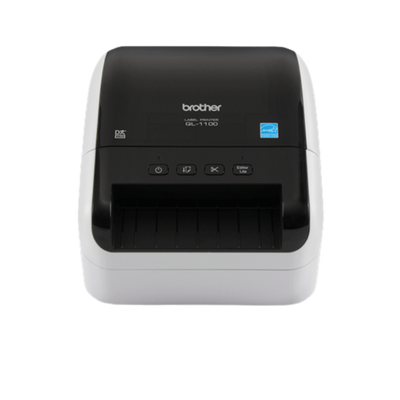
Brother QL-1100 Wide Format Professional Label Printer (QL1100)
Brother QL-1100 Wide Format Professional Label Printer (QL1100)
Compatible with:
QL1100
Couldn't load pickup availability
 Free Shipping Over $500
 Fully Secure Checkout



Shop with confidence
Customer Support
Need help choosing the right configuration?
Talk with a Spartan POS hardware specialist about compatibility, accessories, quantities, or deployment requirements.
Product Description
The Brother QL-1100 (part number QL1100) is a wide-format desktop label printer for Brother DK labels up to 4 in. wide, including DK-1241 4 x 6 in. shipping labels. It connects by USB, has a USB Host port for a peripheral such as a barcode scanner, and uses direct thermal printing with no ink, toner or ribbon. Brother positions it for shipping and postage labels and for online sellers printing product and barcode labels.
Key features
- Labels up to 4 in. wide: 4 in. (101.6 mm) maximum print width.
- Up to 69 labels per minute: Brother's rating for standard address labels with black text at 300 dpi.
- Automatic crop function: prints product and other barcode labels from A4/Letter label-sheet templates (Windows only).
- USB Host port: connects a peripheral such as a barcode scanner.
- Built-in auto cutter: supports banners and signs up to 3 ft long.
- Plug & Label: basic printing without software installation on Windows PCs; free SDKs for Windows, iOS and Android.
Specifications
| Print method | Direct thermal |
|---|---|
| Print resolution | 300 x 300 dpi |
| Print speed | Up to 69 standard address labels per minute (text only, 300 x 300 dpi); max. 4.3 in./sec |
| Maximum print width | 4 in. (101.6 mm) |
| Maximum label width | 102 mm (about 4 in.) |
| Media | Brother DK die-cut labels and continuous-length paper and film tape |
| Interfaces | USB 2.0 Full Speed; USB Host (HID class) |
| Cutter life | Up to 300,000 die-cut labels or 150,000 continuous labels |
| Dimensions / weight | 6.70 in. W x 8.75 in. D x 5.95 in. H; about 3.79 lb without DK rolls |
What's in the box
- USB cable and AC adapter
- DK-1247 die-cut large shipping label starter roll (41 labels)
- DK-2205 2.4 in. (62 mm) continuous black on white paper tape starter roll, 26.2 ft (8 m)
- Software, Quick Setup Guide and documentation
Typical applications
- Shipping and postage labels for packages
- Product and barcode labels for online sellers
- Banners and signs up to 3 ft long on continuous tape
Compatibility
Brother's support site lists the QL-1100 for Windows 11 and earlier Windows versions, Windows Server 2008 through 2025, macOS (up to macOS 26), Linux and Android. Android label design with the free iPrint&Label app requires a USBtoGO cable, purchased separately. Included software: P-touch Editor (Windows and Mac), P-touch Address Book (Windows) and P-touch Update Software.
How it compares
- QL-1100: 4-inch wide format with USB and USB Host.
- QL-1110NWB: same 4 in. print width and speed rating, plus Wi-Fi, Wireless Direct, Ethernet, Bluetooth and iOS/Android app printing.
- QL-800: labels up to 2.4 in. wide with black/red printing on DK-2251 tape; cannot print 4-inch-wide shipping labels.
Frequently asked questions
Can the Brother QL-1100 print 4 x 6 shipping labels?
Yes. Brother lists DK-1241 4 x 6 in. and DK-1247 4.07 x 6.4 in. large shipping labels for the QL-1100. Brother notes that full-width printing may not be possible in every environment and recommends designing labels with enough margin.
Is the QL-1100 wireless?
No. It connects by USB, and its USB Host port is for a peripheral such as a barcode scanner. The QL-1110NWB is the wide-format model with Wi-Fi, Ethernet and Bluetooth.
Can I print from a phone or tablet?
Brother lists Android support: the free iPrint&Label app works with an Android device connected by a USBtoGO cable (sold separately). iOS is not listed for the QL-1100; the QL-1110NWB supports iOS and Android.
Does the QL-1100 need ink, toner or ribbon?
No. It uses direct thermal printing on Brother DK drop-in rolls. Brother cautions that non-genuine replacement labels may damage the printer.
Can it print barcode labels?
Yes, from a connected PC. Brother lists Code 39, Code 128, GS1-128, UPC/EAN, Intelligent Mail (IMb), PDF417, QR Code, Data Matrix, MaxiCode and Aztec, among others. On Windows, the automatic crop function prints barcode labels from A4/Letter label-sheet templates.
See more models in our Brother Mobile collection or compare desktop label printers.