Citizen
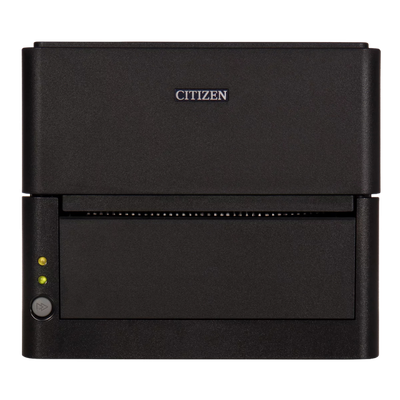
Citizen CL-E300 DT 203 DPI LAN 2.4/5 GHz Wifi USB BK Peeler (CL-E300EXXUBWDPEA)
Citizen CL-E300 DT 203 DPI LAN 2.4/5 GHz Wifi USB BK Peeler (CL-E300EXXUBWDPEA)
Compatible with:
CL-E300EXXUBWDPEA
Couldn't load pickup availability
 Free Shipping Over $500
 Fully Secure Checkout




Shop with confidence
Customer Support
Need help choosing the right configuration?
Talk with a Spartan POS hardware specialist about compatibility, accessories, quantities, or deployment requirements.
Product Description
Citizen CL-E300 Direct Thermal Label Printer, 203 DPI, LAN, WiFi, USB, Black, Peeler
The Citizen CL-E300 is a compact direct thermal label printer designed for retail, warehouse, logistics, inventory, shipping, and barcode labeling workflows where counter space is limited but dependable label printing is still required. This configuration includes 203 dpi printing, LAN, 2.4/5 GHz WiFi, USB connectivity, black housing, and a peeler for label dispensing workflows.
Replacement note: This Citizen CL-E300 203 dpi configuration has been replaced by the newer Citizen CL-E300 Direct Thermal 300 DPI Label Printer with USB, LAN, Serial, Black, Peeler. If you are replacing this model or building a new label printing setup, the 300 dpi replacement model is the recommended current option.
The CL-E300 series is built for businesses that need a small-footprint desktop label printer that can fit into tight workspaces without sacrificing usability. It is a practical choice for barcode labels, product labels, shelf labels, inventory labels, shipping labels, asset labels, and warehouse identification workflows.
Citizen designed the CL-E300 series with a modern compact form factor, easy media handling, and flexible connectivity options. The integrated LinkServer web management and configuration system helps support printer setup and control in networked environments.
Best For
- Retail barcode label printing
- Warehouse and logistics labeling
- Inventory labels and asset labels
- Shipping and receiving workflows
- Product labels and shelf labels
- Small workstations with limited counter space
- Label dispensing workflows that benefit from a peeler
- Businesses replacing older CL-E300 203 dpi configurations
Key Features
- Direct thermal printing: Prints compatible heat-sensitive labels without requiring ribbon.
- 203 dpi resolution: Suitable for standard barcode labels, product labels, and general business labeling.
- Compact footprint: Designed for tight counters, warehouse stations, retail back rooms, and limited workspace environments.
- LAN, WiFi, and USB connectivity: Supports flexible wired and wireless setup options depending on the POS, warehouse, or labeling environment.
- 2.4/5 GHz WiFi support: Helps support wireless label printing in compatible network environments.
- Peeler included: Helps present labels one at a time for faster application in labeling workflows.
- Modern CL-E300 design: Small, clean, and easy to use for retail and warehouse operations.
- LinkServer web management: Allows printer management and configuration through a supported web-based interface.
Technical Specifications
| Brand | Citizen |
| Series | CL-E300 |
| Printer Type | Desktop label printer |
| Print Method | Direct thermal |
| Print Resolution | 203 dpi |
| Connectivity | LAN, 2.4/5 GHz WiFi, USB |
| Color | Black |
| Label Handling | Peeler |
| Media Capacity | Handles media rolls up to 5 inches internally |
| Replacement Model | Citizen CL-E300 Direct Thermal 300 DPI Label Printer with USB, LAN, Serial, Black, Peeler |
Why Choose the Citizen CL-E300?
The Citizen CL-E300 is designed for businesses that need reliable label printing in a small desktop footprint. Its compact design makes it useful for warehouse desks, retail back rooms, shipping stations, checkout counters, office label stations, and other spaces where larger industrial label printers may not fit.
The 203 dpi direct thermal configuration is a practical fit for many everyday labeling applications, including barcode labels, inventory labels, product labels, and warehouse labels. The included peeler supports faster label application by presenting each printed label for easier removal.
For businesses that need a newer replacement, the current 300 dpi replacement model provides improved print detail for smaller text, denser barcodes, and more detailed label formats.
Common Use Cases
- Barcode label printing
- Retail product labeling
- Warehouse inventory labels
- Shipping and receiving labels
- Asset tracking labels
- Shelf labels and bin labels
- Office and back-room label printing
- Label dispensing with peeler support
Setup Guidance
Before setup, confirm your preferred connection method, label size, media type, and software requirements. LAN and WiFi setups may require network configuration, while USB setups generally connect directly to a compatible computer or POS station.
For peeler workflows, confirm that the selected labels are compatible with the printer and dispensing configuration. Direct thermal labels must be compatible with direct thermal printing and the intended application environment.
Related POS Hardware and Supplies
Compatibility Notes
Compatibility depends on your software, operating system, connection type, drivers, label media, barcode requirements, accessories, network configuration, and setup. Confirm compatibility before ordering.
Before purchasing, confirm that your labeling software, warehouse system, POS software, operating system, drivers, network environment, label size, media type, and peeler workflow are compatible with this printer configuration.
Healthcare Printing Applications
The CL-E300 can support healthcare label and barcode workflows when paired with compatible healthcare software, media, drivers, and connection options. Citizen positions label printers for healthcare applications such as admissions, patient records, wristbands, laboratory specimen labels, blood samples, test tubes, pharmacy labels, asset management, and medical device labeling.
- Patient identification and admissions labels
- Patient wristbands when compatible wristband media is supported
- Laboratory specimen labels, blood sample labels, and test tube labels
- Pharmacy prescription labels, shelf labels, and inventory labels
- Healthcare asset labels, equipment labels, and supply-room tracking
- Medical device, product tracking, shipment, and rating labels where applicable
Use this printer with compatible healthcare label printers, patient wristband printers, laboratory label printers, and pharmacy label printers workflows.
Compatibility depends on your POS software, operating system, connection type, drivers, accessories, and configuration. Confirm compatibility before ordering.
Frequently Asked Questions
What is the Citizen CL-E300 used for?
The Citizen CL-E300 is used for desktop label printing, including barcode labels, product labels, inventory labels, shipping labels, shelf labels, bin labels, and warehouse identification labels.
Is this a direct thermal printer?
Yes. This configuration is direct thermal, which means it prints on compatible heat-sensitive labels without using ribbon.
What print resolution does this model use?
This configuration uses 203 dpi print resolution.
Does this printer include a peeler?
Yes. This configuration includes a peeler for label dispensing workflows.
What replaced this model?
This 203 dpi configuration has been replaced by the Citizen CL-E300 Direct Thermal 300 DPI Label Printer with USB, LAN, Serial, Black, Peeler.
Why choose the 300 dpi replacement model?
The 300 dpi replacement model is better for more detailed labels, smaller text, denser barcodes, and applications that require sharper print output.
Can Spartan POS help confirm compatibility?
Yes. Spartan POS can help confirm compatibility with your software, drivers, operating system, label media, barcode requirements, connection type, and peeler setup before ordering.
Bottom Line
The Citizen CL-E300 direct thermal 203 dpi label printer is a compact desktop label printer for retail, warehouse, inventory, shipping, and barcode labeling workflows. With LAN, 2.4/5 GHz WiFi, USB connectivity, black housing, and peeler support, it is a practical option for businesses that need dependable label printing in tight spaces. For new deployments or replacements, consider the newer Citizen CL-E300 300 dpi replacement model.