Skip to product information

Citizen

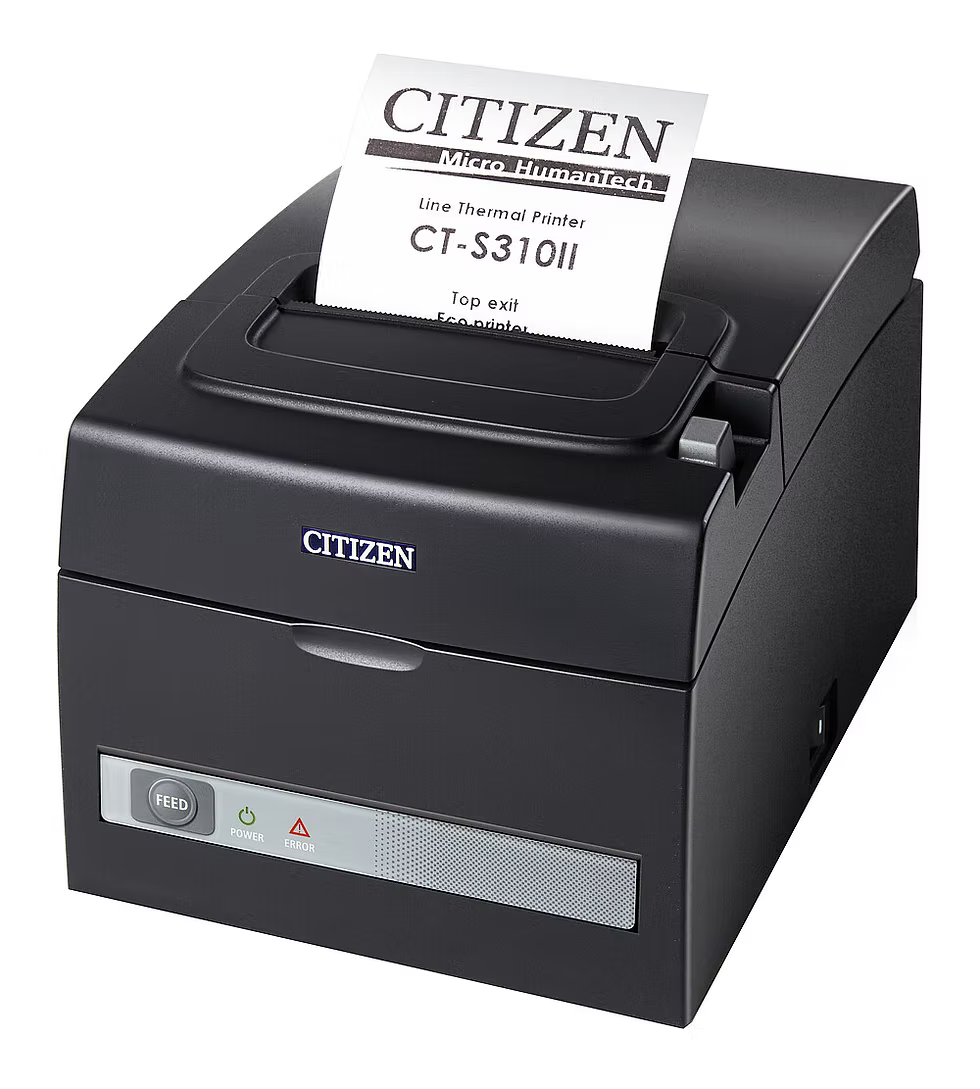
Citizen CT-S310II Thermal POS Printer, USB and Serial, Black

Citizen CT-S310II Thermal POS Printer, USB and Serial, Black

Compatible with:


Citizen CT-S310II printer for healthcare receipts, queue tickets, pharmacy checkout, front-desk, and service-area workflows when properly configured.

CT-S310II-U-BK

Regular price $164.00 USD
Sale price $164.00 USD Regular price
Shipping calculated at checkout.

  • Free Shipping Over $500
  • Fully Secure Checkout

Product Description

The Citizen CT-S310II Receipt Printer is a proven thermal POS receipt printer for wireless stores, retail checkout counters, restaurants, service businesses, and legacy POS replacement projects that need reliable USB receipt printing in a compact black desktop design. This model is one of Spartan POS’s best-selling Citizen receipt printers and is a strong fit for businesses that want dependable daily receipt printing without overcomplicating the checkout station.

The CT-S310II is commonly used in wireless retail stores, phone stores, service counters, restaurants, and retail POS environments where a compact thermal receipt printer is needed for customer receipts, transaction records, order slips, and checkout documentation. Spartan POS is an authorized dealer and supports the receipt printers, receipt paper, cash drawers, and related POS accessories it sells.

Quick Answer

The Citizen CT-S310II is a compact thermal receipt printer best suited for compatible retail, restaurant, wireless store, and service-counter POS systems that support this printer model and interface. It is a practical choice for businesses replacing an existing Citizen receipt printer, adding a reliable USB receipt printer, or standardizing receipt printing across multiple checkout stations.

If your POS setup requires Ethernet, Bluetooth, Wi-Fi, iPad support, or network-based printing, confirm the exact printer interface before ordering or browse additional POS receipt printer options.

Best For

  • Wireless retail stores and phone store checkout counters
  • Retail POS systems and service counters
  • Restaurants, cafes, quick-service counters, and hospitality environments
  • Businesses replacing an existing Citizen CT-S310II or similar receipt printer
  • Fixed POS stations that need reliable thermal receipt printing
  • Cost-conscious multi-location receipt printer rollouts
  • Checkout setups that use compatible thermal receipt paper

Important Model Clarification

Receipt printer model numbers and interfaces matter. The Citizen CT-S310II family may be available in different configurations, colors, and connection types. Before ordering, confirm that this exact model matches your POS software, operating system, connection type, cable requirements, cash drawer setup, and receipt paper requirements.

Detail This Product
Brand Citizen
Model family CT-S310II
Printer type Direct thermal POS receipt printer
Color Black
Common use Retail receipts, wireless store receipts, restaurant receipts, service-counter receipts, and POS transaction printing
Best-fit buyer Businesses that need a proven Citizen thermal receipt printer for compatible POS checkout environments
Confirm before ordering Exact interface, POS software support, operating system, cable needs, drawer kick support, and receipt paper size

Why Businesses Choose the Citizen CT-S310II

The Citizen CT-S310II is popular because it focuses on what many POS environments actually need: reliable receipt printing, a compact footprint, straightforward setup, and dependable operation at the checkout counter. It is especially useful for businesses that do not need an oversized printer or a complex specialty printer, but still need commercial-grade receipt output.

  • Proven receipt printer platform: A dependable Citizen receipt printer family used in retail, restaurant, service, and wireless store POS environments.
  • Compact desktop design: Fits checkout counters, service desks, phone stores, small retail counters, and space-limited POS stations.
  • Thermal receipt printing: Prints on compatible thermal paper without ink, toner, or impact printer ribbons.
  • Strong replacement fit: A practical option when replacing an existing CT-S310II or similar Citizen POS receipt printer.
  • Cost-conscious rollout option: A strong fit for multi-register or multi-location businesses that need consistent receipt printing.
  • Spartan POS support: Spartan POS supports the receipt printers, paper, and related checkout hardware it sells.

Key Features

  • Compact Citizen thermal receipt printer for daily POS checkout use
  • Direct thermal printing with no ink or toner required
  • Black housing for modern retail, restaurant, and service-counter environments
  • Designed for customer receipts, transaction records, order slips, and POS receipt printing
  • Works with compatible thermal receipt paper
  • Useful for wireless stores, retail counters, restaurants, hospitality desks, and service businesses
  • Strong option for replacing existing Citizen receipt printer installations
  • Can be paired with compatible cash drawers when supported by the printer, cable, and POS software

Citizen CT-S310II vs Other Printer Types

Printer Type Best Use When to Choose It
Citizen CT-S310II receipt printer Retail, wireless store, restaurant, and service-counter receipt printing Choose this printer when your POS system supports the CT-S310II and you need a compact Citizen thermal receipt printer for customer receipts.
Thermal receipt printer Customer receipts, checkout counters, cashier stations, and service desks Choose a thermal receipt printer when the output is a customer receipt or transaction slip.
Impact kitchen printer Kitchen tickets, bar tickets, prep stations, and hot back-of-house environments Choose an impact printer when you need bond paper and ribbon-based kitchen ticket printing.
Label printer Barcode labels, shipping labels, food labels, pickup labels, and product labels Choose a label printer when the printed output needs to stick to a bag, product, shelf, package, container, or item.

For a broader printer comparison, review the kitchen printer vs receipt printer vs label printer guide.

Best Use Cases

Wireless Stores and Phone Retailers

The Citizen CT-S310II is a strong fit for wireless retail stores, phone stores, accessory shops, service counters, and activation-focused businesses that need reliable receipt printing at the point of sale. It can be used for customer receipts, transaction records, payment receipts, service receipts, and retail checkout documentation when supported by the POS system.

Retail Checkout Counters

Retail businesses can use the CT-S310II for standard checkout receipts, order confirmations, returns, exchanges, and transaction documentation. Pair it with compatible receipt paper, cash drawers, and barcode scanners to build a complete checkout station.

Restaurants and Service Counters

Restaurants, cafes, and service counters can use the CT-S310II for front-of-house receipt printing. For hot kitchen ticket printing, compare impact kitchen printers and review the restaurant kitchen printer setup guide.

Legacy POS Replacement

If you are replacing an older Citizen receipt printer, the CT-S310II may be a practical option when the interface, driver support, paper size, and POS configuration match your existing setup. Always verify the exact model and connection type before replacing a live POS printer.

What You May Need With This Printer

A complete receipt printer setup may require more than the printer itself. Depending on your POS system and installation, you may need:

  • Thermal receipt paper compatible with your printer and receipt size requirements
  • Receipt paper for compatible POS receipt printer workflows
  • A compatible USB, Serial, Ethernet, or other interface cable depending on the exact printer configuration
  • A compatible power supply if one is not included or already available
  • Cash drawer and correct drawer cable if the printer will trigger a cash drawer
  • Barcode scanner for retail checkout, product lookup, wireless store sales, or inventory workflows
  • Label printer if you also need barcode labels, product labels, shipping labels, food labels, or pickup labels

Receipt Paper for the Citizen CT-S310II

The Citizen CT-S310II is a thermal receipt printer, so it should be used with compatible thermal receipt paper. Receipt paper compatibility depends on paper width, roll diameter, core size, printer configuration, and how your POS station is installed.

For high-volume retail, restaurant, and wireless store environments, keeping paper in stock is just as important as choosing the printer. Browse receipt paper or review the receipt paper size guide before ordering replacement rolls.

When This May Not Be the Right Printer

The Citizen CT-S310II is a strong receipt printer, but it is not the correct printer for every workflow.

If You Need Consider Instead Why
Kitchen tickets in a hot restaurant kitchen Impact kitchen printer Impact printers use bond paper and ribbons, which are commonly preferred for hot kitchen ticket environments.
Barcode labels or product labels Label printer Labels require label media and a compatible label printer, not standard receipt paper.
Pickup, takeout, drink, or bag labels Restaurant label printer Labels can stay attached to bags, cups, containers, and pickup orders.
Tablet, iPad, Bluetooth, Wi-Fi, or network printing Compatible interface-specific receipt printer Tablet and network POS systems often require specific supported printer models and interfaces.

Setup and Replacement Tips

  • Confirm the exact Citizen model and interface before replacing an existing printer.
  • Check whether your POS software supports the CT-S310II and the exact connection type being used.
  • Confirm whether your setup requires USB, Serial, Ethernet, or another interface.
  • Verify driver requirements before installation.
  • Use compatible thermal receipt paper and avoid using bond paper or label rolls in a thermal receipt printer.
  • Confirm cash drawer compatibility if the printer will open a drawer.
  • Print a test receipt after setup to verify alignment, cutting, receipt formatting, and drawer kick settings.
  • For driver resources, review the POS printer drivers and manufacturer download links.

Healthcare Printing Applications

The CT-S310II can support healthcare receipt, ticket, queue, and front-desk printing workflows when paired with compatible software, paper, drivers, and connection options. Citizen positions receipt printers for healthcare areas such as admissions, queue management, paperwork identification, cafeteria and other service areas, pharmacy receipt printing, and private practice office workflows.

  • Clinic, hospital, and private-practice front-desk receipts
  • Queue management and patient-service tickets
  • Pharmacy checkout, prescription pickup, and customer receipt printing
  • Cafeteria, gift shop, and healthcare retail transaction printing
  • Self-service terminal receipts and administrative documentation

See related healthcare receipt printers and the full guide to Citizen healthcare printing solutions.

Compatibility depends on your POS software, operating system, connection type, drivers, accessories, and configuration. Confirm compatibility before ordering.

Compatibility Guidance

Receipt printer compatibility depends on the exact printer model, interface, POS software, operating system, driver, cable, power supply, paper size, cash drawer setup, and configuration. A receipt printer that works with one POS platform may not be supported by another, even if the printer hardware looks similar.

Compatibility depends on your POS software, operating system, connection type, drivers, accessories, and configuration. Confirm compatibility before ordering.

Before purchasing the Citizen CT-S310II, confirm the exact printer interface and verify support with your POS software provider. If your system requires Ethernet, Bluetooth, Wi-Fi, iPad support, or a specific certified printer list, choose the model and interface that your POS provider supports.

Related Categories and Guides

Frequently Asked Questions

Is the Citizen CT-S310II a thermal receipt printer?

Yes. The Citizen CT-S310II is a direct thermal POS receipt printer. It prints on compatible thermal receipt paper and does not require ink, toner, or impact printer ribbons.

What is the Citizen CT-S310II best used for?

The Citizen CT-S310II is best used for POS receipt printing in compatible retail stores, wireless stores, restaurants, cafes, service counters, hospitality desks, and checkout environments.

Is the Citizen CT-S310II good for wireless stores?

Yes, the CT-S310II is a strong fit for many wireless store and phone retailer checkout environments when the POS system supports the exact printer model and interface. It is commonly used for customer receipts, service receipts, payment receipts, and transaction records.

Does this printer need ink or toner?

No. The Citizen CT-S310II is a thermal receipt printer, so it does not use ink or toner. It requires compatible thermal receipt paper.

What paper should I use with the Citizen CT-S310II?

Use compatible thermal receipt paper that matches the printer’s supported paper width, roll diameter, and core requirements. Browse thermal paper or review the receipt paper size guide before ordering.

Can the Citizen CT-S310II open a cash drawer?

Cash drawer support depends on the printer configuration, POS software, drawer cable, cash drawer model, and system setup. Confirm compatibility before pairing this printer with a cash drawer.

Is the Citizen CT-S310II a kitchen printer?

The CT-S310II is a thermal receipt printer. It may be used for receipt or order-slip printing in compatible environments, but hot restaurant kitchens often use impact kitchen printers because impact printers use bond paper and ribbons instead of thermal paper.

Is this the same as a label printer?

No. The Citizen CT-S310II prints receipts on thermal receipt paper. If you need barcode labels, shipping labels, food labels, product labels, pickup labels, or bag labels, browse label printers and labels.

Can I use this printer with Shopify POS, Square, Lightspeed, or an iPad POS system?

Do not assume compatibility based on printer brand alone. Shopify POS, Square, Lightspeed, iPad POS systems, and tablet-based POS platforms may require specific supported printer models and interfaces. Confirm the exact Citizen CT-S310II model, connection type, and POS support before ordering.

Is this a good replacement for an older Citizen receipt printer?

It can be, but replacement compatibility depends on the old printer model, interface, drivers, cable, power supply, receipt paper size, cash drawer setup, and POS software. Confirm the exact replacement requirements before ordering.

Where can I find printer drivers?

Driver requirements depend on your operating system and POS software. Start with the POS printer drivers and manufacturer download links, then confirm installation steps with your POS provider or system administrator.

Bottom Line

The Citizen CT-S310II Receipt Printer is a proven thermal POS receipt printer for compatible wireless stores, retail counters, restaurants, service desks, and legacy POS replacement workflows. It is a strong choice when you need a compact Citizen receipt printer for customer receipts, transaction records, order slips, and daily checkout printing.

Choose the Citizen CT-S310II when your POS system supports the exact model and interface you are ordering. For a complete checkout setup, pair it with compatible thermal receipt paper, cash drawers, barcode scanners, and other supported POS hardware from Spartan POS.

Citizen CT-S310II Thermal POS Printer, USB and Serial, Black

$164.00 USD