Epson
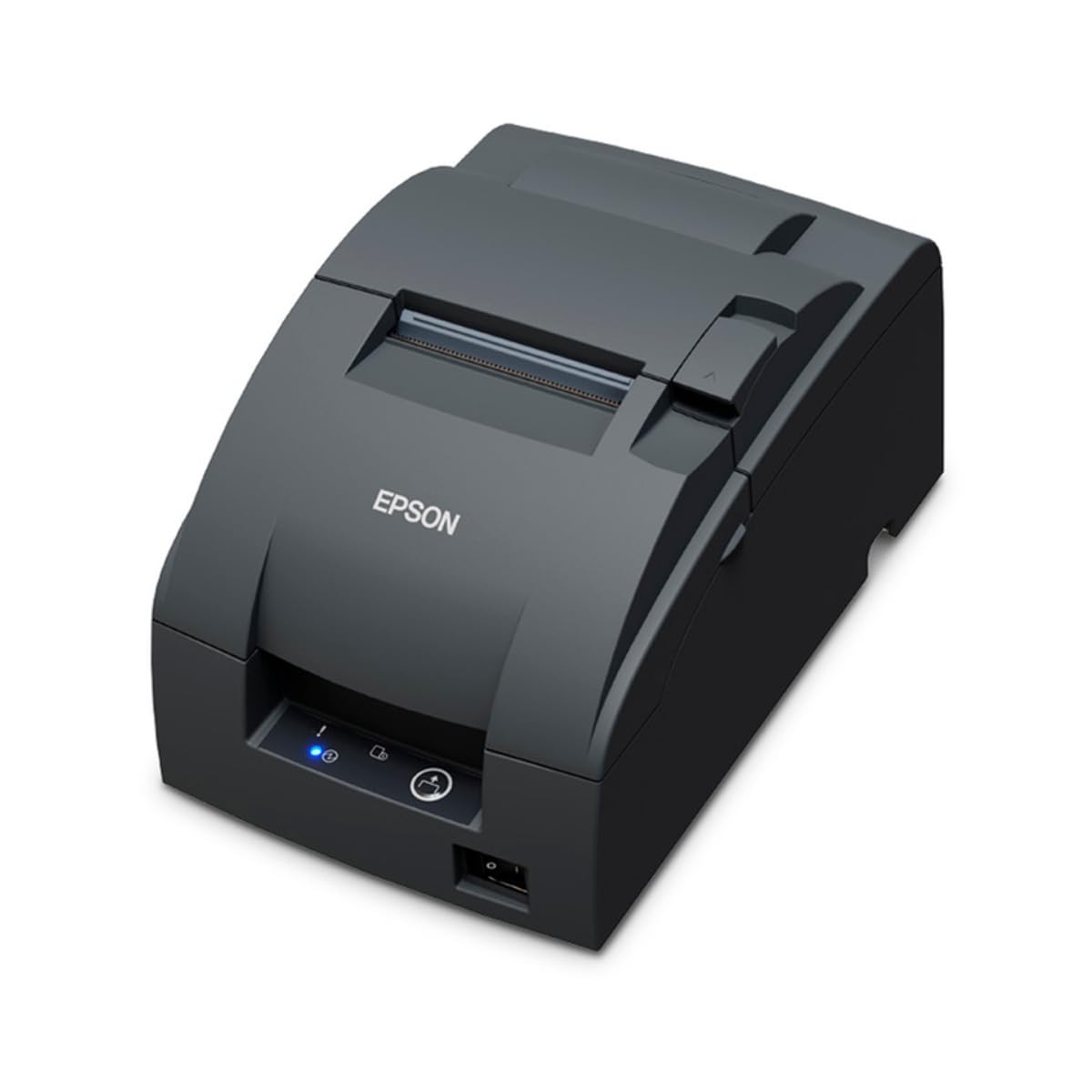
Epson, TM-U220IIB, Impact Kitchen Receipt Printer, USB
Epson, TM-U220IIB, Impact Kitchen Receipt Printer, USB
Compatible with:
C31CL27042A3
Couldn't load pickup availability
 Free Shipping Over $500
 Fully Secure Checkout



Shop with confidence
Customer Support
Need help choosing the right configuration?
Talk with a Spartan POS hardware specialist about compatibility, accessories, quantities, or deployment requirements.
Product Description
Epson, TM-U220IIB, Impact Kitchen Receipt Printer, USB
SKU / MPN: C31CL27042A3
Quick Answer
The Epson TM-U220 impact receipt printer is a dependable choice for restaurant kitchens, bars, dry cleaners, service counters, and other environments where order tickets and receipts need to stay readable in heat, humidity, grease, moisture, and heavy daily use.
Referenced replacement / prior-version information: aging dot matrix receipt printe.
Best For / Common Use Cases
- Retail checkout
- restaurant and hospitality receipts
- grocery and convenience checkout
- POS receipt printing
Compatibility
Compatibility depends on your POS software, operating system, connection type, drivers, accessories, and configuration. Confirm compatibility before ordering.
Detailed Product Information
The Epson TM-U220 impact receipt printer is a dependable choice for restaurant kitchens, bars, dry cleaners, service counters, and other environments where order tickets and receipts need to stay readable in heat, humidity, grease, moisture, and heavy daily use.
Unlike a thermal receipt printer, the Epson TM-U220 uses an ink ribbon and bond paper to produce durable dot matrix prints. That makes it a better fit for kitchen tickets, prep stations, bar orders, dry cleaner receipts, and service counters where thermal paper can darken, fade, smear, or become difficult to read.
Best For
- Restaurant kitchen order printing
- Bars, cafes, coffee shops, and food prep stations
- Dry cleaners and service counters
- Impact receipt printing where durability matters
- High-heat or humid environments where thermal paper may not perform well
- Businesses replacing or standardizing on Epson kitchen printers
Why Choose the Epson TM-U220?
The Epson TM-U220 is built for businesses that need a rugged impact receipt printer instead of a standard thermal printer. Its ribbon-based printing is well suited for kitchen tickets, order slips, receipts, and other printed documents that need to remain legible in demanding operating conditions.
For restaurants and hospitality businesses, the TM-U220 is commonly used as a kitchen printer because it can handle the real-world conditions found near grills, fryers, steam, prep areas, and bar stations. For dry cleaners and service counters, it provides reliable printed receipts without relying on heat-sensitive thermal media.
Impact Printing vs. Thermal Printing
Thermal receipt printers are fast and quiet, but they rely on heat-sensitive paper. In hot, humid, or greasy environments, thermal prints can discolor or fade over time. The Epson TM-U220 uses impact printing with an ink ribbon, making it a stronger option when print durability matters more than quiet thermal output.
Epson TM-U220A vs. TM-U220B vs. TM-U220D
The Epson TM-U220 series is available in A, B, and D versions. All three are impact receipt printers designed for rugged POS, kitchen, bar, and service counter environments, but they differ in cutter style, journal handling, and mounting options.
| Version | Main Difference | Best Fit |
|---|---|---|
| TM-U220A | Includes an autocutter and a take-up journal device. | Best when the business needs an internal journal copy or audit trail in addition to printed receipts or tickets. |
| TM-U220B | Includes an autocutter but does not include the take-up journal device. | Best for most restaurant kitchen, bar, and service counter applications where automatic cutting is useful. |
| TM-U220D | Manual-cut version without an autocutter or take-up journal device. | Best for lower-cost or simpler setups where employees can manually tear receipts or kitchen tickets. |
For most kitchen and bar printing applications, the TM-U220B is commonly the best fit because it provides automatic cutting without the journal take-up mechanism found on the TM-U220A. The TM-U220D is a simpler option when manual tearing is acceptable. The TM-U220A is better suited for businesses that need a journal copy or additional internal record handling.
The A, B, and D version names do not automatically determine the connection type. Epson TM-U220 printers may come in different interface configurations, such as USB, Ethernet, serial, or other POS interface options depending on the full part number. Always confirm the exact model, interface, cable, power supply, and POS software requirements before ordering.
Compatible Receipt Paper
The Epson TM-U220B impact receipt printer requires 3-inch bond receipt paper rolls. Do not use standard thermal receipt paper with this printer. For best performance, use bond paper designed for impact receipt printers and compatible Epson TM-U220 configurations.
- Uses 3-inch bond receipt paper rolls
- Designed for Epson TM-U220B and other compatible impact printers
- Ideal for kitchen, bar, dry cleaner, and service counter use
- Better suited than thermal paper for heat, humidity, grease, and moisture exposure
Shop compatible supplies in our receipt paper collection, or browse additional receipt printers for POS, kitchen, and service counter setups.
Common Use Cases
- Kitchen ticket printing: Send clear order tickets to prep stations, grills, fryers, and expo areas.
- Bar order printing: Print drink orders and service tickets in busy bar environments.
- Dry cleaner receipts: Create durable customer receipts and order slips for garment service workflows.
- Service counter printing: Print receipts, tickets, and customer order documents at high-use counters.
- Impact printer replacement: Replace aging dot matrix receipt printers with a proven Epson impact printer platform.
Setup and Compatibility
The Epson TM-U220 is available in multiple configurations, including different interfaces and model variations. Before ordering, confirm the exact connection type your POS system requires, such as USB, Ethernet, serial, or another supported interface.
Compatibility depends on your POS software, operating system, connection type, drivers, accessories, and configuration. Confirm compatibility before ordering.
Recommended POS Hardware Pairings
The Epson TM-U220 is often used as part of a complete POS hardware setup. Depending on your business, it may be paired with cash drawers, front-counter receipt printers, compatible bond receipt paper, and other POS peripherals.
Why Buy from Spartan POS?
Spartan POS is an authorized dealer and supports the POS hardware it sells. Our team can help you choose the correct Epson TM-U220 configuration, confirm receipt paper requirements, and make sure your printer fits your POS environment before you order.
FAQ
Is the Epson TM-U220 a thermal printer?
No. The Epson TM-U220 is an impact receipt printer. It uses an ink ribbon and bond receipt paper instead of thermal paper.
Why is the Epson TM-U220 used in kitchens?
The TM-U220 is commonly used in kitchens because impact printing is better suited for heat, humidity, grease, and moisture than thermal printing. This helps kitchen tickets stay readable in demanding restaurant environments.
What paper does the Epson TM-U220B use?
The Epson TM-U220B uses 3-inch bond receipt paper rolls. Standard thermal receipt paper should not be used with this printer.
Is the Epson TM-U220 good for dry cleaners?
Yes. The TM-U220 is a strong option for dry cleaners and service counters that need durable receipt printing without relying on heat-sensitive thermal paper.
How do I know which Epson TM-U220 model to order?
Check your POS software requirements, connection type, and printer configuration before ordering. TM-U220 models may vary by interface, cutter options, color, and other configuration details.
Bottom Line
The Epson TM-U220 impact receipt printer is a proven solution for kitchens, bars, dry cleaners, and service counters that need reliable receipt and ticket printing in tough environments. If thermal paper is not the right fit because of heat, humidity, grease, or moisture, the TM-U220 remains one of the most dependable Epson impact printer options for business use.
Common Buying Mistakes
- Ordering a similar model number instead of the exact SKU / MPN.
- Assuming the interface, cable, power supply, accessories, drivers, or software support are identical across variants.
- Substituting a replacement or prior version without confirming configuration differences.
Frequently Asked Questions
What is the Epson, TM-U220IIB, Impact Kitchen Receipt Printer, USB?
This listing is for the exact receipt printer configuration identified by SKU / MPN C31CL27042A3. Confirm the manufacturer part number and configuration before ordering.
Who is this product best for?
Retail checkout, restaurant and hospitality receipts, grocery and convenience checkout, POS receipt printing.
What should I verify before ordering?
Compatibility depends on your POS software, operating system, connection type, drivers, accessories, and configuration. Confirm compatibility before ordering.
Is there a replacement or prior-version relationship?
The current catalog information references: aging dot matrix receipt printe. Verify the exact replacement path and compatibility before substituting models.
Can Spartan POS help confirm compatibility?
Yes. Spartan POS supports the POS hardware, accessories, and supplies it sells and can help confirm the correct model, interface, accessories, and replacement path before ordering.
Need Help Confirming Compatibility?
Need help choosing compatible POS hardware? Chat with a Spartan POS specialist before ordering.