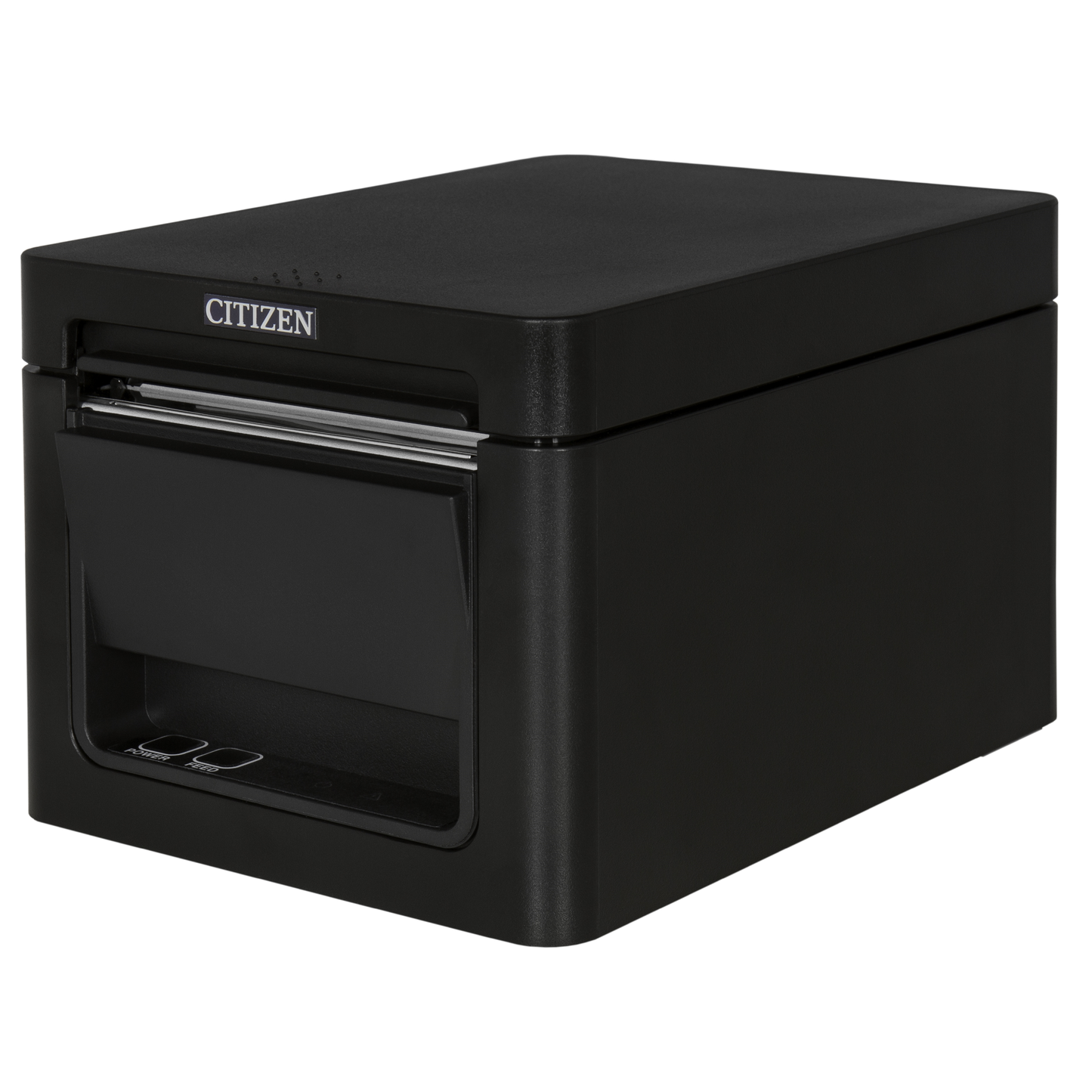
Citizen CT-E351 Receipt Printer – Front Exit, USB & Serial, Black
Compatible with:
CT-E351RSU-BK
Couldn't load pickup availability
Free Shipping Over $500
Fully Secure Checkout
Product Description
The Citizen CT-E351 Thermal Receipt Printer is a compact front-exit POS receipt printer designed for retail checkout counters, restaurants, cafes, hospitality desks, and space-limited point-of-sale installations. Its front-exit paper path helps protect receipts from spills, dust, and countertop debris while making it easier to place the printer under shelves, near walls, or in tight checkout areas.
This model is configured with USB and Serial connectivity, making it a practical choice for compatible Windows-based POS systems, legacy serial POS environments, and fixed checkout stations that do not require Ethernet, Wi-Fi, or Bluetooth printing. Spartan POS is an authorized dealer and supports the Citizen receipt printers, POS receipt printers, receipt paper, and related accessories it sells.
Quick Answer
The Citizen CT-E351 is a compact thermal receipt printer for businesses that need a front-exit receipt printer with USB and Serial connectivity. It is a strong fit for retail, restaurant, cafe, hospitality, and service-counter POS environments where counter space is limited and the POS system supports USB or Serial receipt printing.
If your POS setup requires Ethernet, Bluetooth, Wi-Fi, iPad compatibility, or network printing, confirm the correct interface before ordering or browse other receipt printer options.
Best For
- Retail POS systems and checkout counters
- Restaurants, cafes, bars, and quick-service counters
- Hospitality, front desk, and service environments
- Space-limited countertop installations
- Windows-based POS systems that support USB or Serial receipt printing
- Businesses replacing or adding a compact Citizen thermal receipt printer
Important Model Clarification
| Feature | This CT-E351 Configuration |
|---|---|
| Printer type | Thermal POS receipt printer |
| Paper exit | Front exit |
| Connectivity | USB and Serial |
| Best fit | Fixed POS checkout stations using compatible USB or Serial connections |
| Not ideal for | Network, iPad, Bluetooth, or Wi-Fi POS setups unless your exact POS configuration supports this model and interface |
Key Features
- Compact thermal receipt printer for retail, restaurant, and hospitality POS environments
- Front-exit paper path helps reduce exposure to spills, dust, and countertop debris
- USB and Serial connectivity for compatible POS systems
- Fast thermal receipt printing for daily checkout use
- 203 DPI print resolution for clear receipt text and graphics
- Auto-cutter for clean receipt output
- Modern low-profile design for customer-facing counters and tight spaces
- No ink or toner required when used with compatible thermal receipt paper
Citizen CT-E351 vs Other Receipt Printer Types
| Printer Type | Best Use | When to Choose It |
|---|---|---|
| Citizen CT-E351 USB/Serial | Compact front-exit receipt printing | Choose this model when your POS system supports USB or Serial receipt printing and you need a compact front-exit printer. |
| Ethernet receipt printer | Networked POS printing | Choose Ethernet when multiple terminals, network routing, or LAN-based printing is required. |
| Bluetooth receipt printer | Tablet or mobile POS setups | Choose Bluetooth only when your POS software and device specifically support Bluetooth receipt printing. |
| Impact kitchen printer | Kitchen tickets and hot back-of-house environments | Choose an impact printer for kitchen ticket printing where bond paper and ribbons are preferred over thermal paper. |
| Label printer | Barcode labels, food labels, shipping labels, and pickup labels | Choose a label printer when the output needs to stick to products, bags, cups, containers, shelves, or packages. |
Product Details
| Brand | Citizen |
| Model | CT-E351 |
| Printer type | Thermal receipt printer |
| Print resolution | 203 DPI |
| Print speed | Up to 250 mm/sec |
| Connectivity | USB and Serial |
| Paper exit | Front exit |
| Cutter | Auto-cutter |
| Common use | Retail receipts, restaurant receipts, hospitality receipts, service-counter receipts, and POS transaction printing |
Where This Printer Fits
The Citizen CT-E351 is best suited for front-of-house and checkout environments where the printer sits near the POS terminal and prints customer receipts. Its compact front-exit design can be useful in tight spaces where top-exit printers may be harder to access or more exposed to spills.
For restaurants, this printer is better suited for customer receipts and counter printing than hot kitchen ticket printing. If you need back-of-house kitchen tickets, compare impact kitchen printers and review the kitchen printer vs receipt printer vs label printer guide. If you need pickup, delivery, bag, drink, or food labels, browse label printers and labels.
What You May Need With This Printer
- Thermal receipt paper compatible with your printer and receipt size requirements
- Receipt paper for compatible POS receipt printer workflows
- USB or Serial cable, depending on your POS setup and what is included with the printer
- Compatible power supply, if not already included or already available
- Cash drawer if your POS station uses printer-driven drawer kick functionality
- Barcode scanner for retail checkout, product lookup, and inventory workflows
Healthcare Printing Applications
The CT-E351 can support healthcare receipt, ticket, queue, and front-desk printing workflows when paired with compatible software, paper, drivers, and connection options. Citizen positions receipt printers for healthcare areas such as admissions, queue management, paperwork identification, cafeteria and other service areas, pharmacy receipt printing, and private practice office workflows.
- Clinic, hospital, and private-practice front-desk receipts
- Queue management and patient-service tickets
- Pharmacy checkout, prescription pickup, and customer receipt printing
- Cafeteria, gift shop, and healthcare retail transaction printing
- Self-service terminal receipts and administrative documentation
See related healthcare receipt printers and the full guide to Citizen healthcare printing solutions.
Compatibility depends on your POS software, operating system, connection type, drivers, accessories, and configuration. Confirm compatibility before ordering.
Compatibility Guidance
This Citizen CT-E351 configuration includes USB and Serial connectivity. It is not the same as an Ethernet, Wi-Fi, or Bluetooth printer. Before ordering, confirm that your POS software supports the Citizen CT-E351 with the exact interface required for your setup.
Compatibility depends on your POS software, operating system, connection type, drivers, accessories, and configuration. Confirm compatibility before ordering.
For mobile, tablet, iPad, cloud POS, or network-based installations, you may need a different receipt printer interface such as Ethernet or Bluetooth. For printer drivers and manufacturer resources, review the POS printer drivers and manufacturer download links.
Related Categories and Guides
Frequently Asked Questions
Is the Citizen CT-E351 a thermal receipt printer?
Yes. The Citizen CT-E351 is a thermal POS receipt printer designed for compatible receipt printing applications. It uses compatible thermal receipt paper and does not require ink, toner, or printer ribbons.
What connection does this Citizen CT-E351 include?
This configuration includes USB and Serial connectivity. Confirm that your POS software and hardware support USB or Serial receipt printing before ordering.
Is this Citizen CT-E351 compatible with iPad POS systems?
Not automatically. Many iPad POS systems require specific Bluetooth, Ethernet, or supported network printer models. Confirm the exact printer model and interface with your POS provider before ordering.
Can this printer be used in a restaurant?
Yes, the Citizen CT-E351 can be used in restaurant POS environments for front counter receipts, cashier receipts, and service-counter printing when compatible with the POS system. For hot kitchen ticket printing, compare impact kitchen printers.
Does this printer need ink?
No. As a thermal receipt printer, the Citizen CT-E351 does not use ink or toner. It prints on compatible thermal receipt paper.
What paper should I use with this printer?
Use compatible thermal receipt paper that matches the printer’s supported paper width, roll diameter, and core requirements. Browse thermal paper or review the receipt paper size guide before ordering.
Is this a good printer for tight counter spaces?
Yes. The CT-E351 is designed with a compact footprint and front-exit paper path, making it a strong option for space-limited counters and customer-facing checkout areas.
Can this printer open a cash drawer?
Cash drawer support depends on the printer configuration, POS software, cash drawer cable, and system setup. Confirm compatibility before pairing this printer with a cash drawer.
Bottom Line
The Citizen CT-E351 Thermal Receipt Printer is a compact front-exit POS printer for compatible retail, restaurant, hospitality, and service-counter checkout environments. This USB and Serial configuration is best for POS systems that specifically support those interfaces and need a space-saving receipt printer for daily transaction printing.
Choose this model when you need a compact Citizen receipt printer with USB and Serial connectivity. Choose a different receipt printer configuration if your POS system requires Ethernet, Bluetooth, Wi-Fi, iPad support, or network-based printing.

$185.82 USD