Citizen
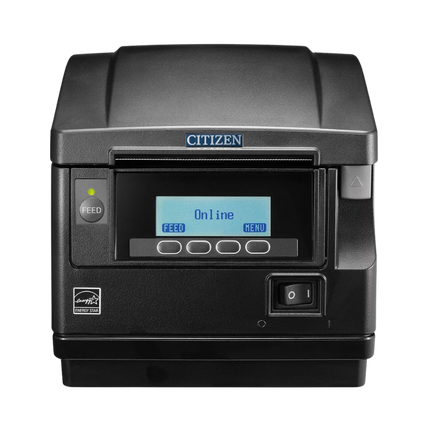
Citizen CT-S851III Type III Front-Exit Thermal POS Printer, USB, Black
Citizen CT-S851III Type III Front-Exit Thermal POS Printer, USB, Black
Compatible with:
CT-S851IIIS3NNUBKP
Couldn't load pickup availability
 Free Shipping Over $500
 Fully Secure Checkout




Shop with confidence
Customer Support
Need help choosing the right configuration?
Talk with a Spartan POS hardware specialist about compatibility, accessories, quantities, or deployment requirements.
Product Description
The Citizen CT-S851IIIS3NNUBKP CT-S851III Front-Exit Thermal Receipt Printer is a black USB POS receipt printer built for retail, restaurant counter, hospitality, café, service desk, and checkout environments that need reliable direct thermal receipt printing in a compact front-exit design. This exact model is the USB black front-exit version, making it a strong fit for supported POS systems that connect to a receipt printer directly by USB.
Also searched as the Citizen CT-S851III, CT-S851IIIS3NNUBKP, Citizen CT-S851III USB black printer, Citizen front-exit receipt printer, Citizen USB thermal POS printer, CT-S851III S3NNUBKP, and Citizen black receipt printer, this model is commonly evaluated by businesses replacing or standardizing around Citizen front-exit thermal receipt printers, including older CT-S851 and CT-S851II-style front-exit printer workflows.
Spartan POS is an authorized dealer for many leading POS hardware brands and supports the products it sells. Spartan POS can help confirm the correct receipt printer model, USB interface, receipt paper, cash drawer setup, drivers, accessories, and POS software compatibility before ordering.
Build a complete checkout setup with receipt printers, receipt paper, thermal paper, cash drawers, barcode scanners, and related POS hardware.
Quick Answer
The Citizen CT-S851IIIS3NNUBKP is best for businesses that need a black front-exit thermal receipt printer with USB connectivity. Choose this model when your POS system supports a USB-connected Citizen CT-S851III printer and your counter layout benefits from receipts exiting from the front instead of the top.
This is not the Ethernet, Bluetooth, Wi-Fi, or serial version. If your POS system requires network printing, mobile tablet pairing, or another interface, confirm the correct Citizen CT-S851III configuration before ordering.
Compatibility depends on your POS software, operating system, connection type, drivers, accessories, and configuration. Confirm compatibility before ordering.
Who Is This For?
- Retail checkout counters that need a dependable USB receipt printer.
- Restaurants, cafés, bakeries, bars, and quick-service counters using supported USB printer setups.
- Hospitality desks, service counters, and customer-facing POS stations.
- Businesses with limited counter space where a front-exit receipt path is preferred.
- Checkout areas where spills, dust, crumbs, or debris make a top-exit paper path less ideal.
- Businesses replacing or standardizing around Citizen CT-S851, CT-S851II, or CT-S851III front-exit printer workflows.
- POS setups using compatible cash drawers, barcode scanners, and thermal receipt paper.
Why Choose This Model?
The CT-S851III front-exit design is useful when the printer sits under a shelf, close to other POS hardware, near a pickup counter, or in a service area where staff need easy access to receipts without reaching over the top of the printer. Because receipts exit from the front, the printer can fit into tighter countertop layouts than many top-exit receipt printers.
This black USB version is especially useful for businesses that want a clean-looking receipt printer that matches modern black terminals, stands, payment devices, and checkout hardware. It also avoids ink, toner, and ribbon supplies because it uses direct thermal printing with compatible thermal receipt paper.
Important Model Clarification
| Product Name | Citizen CT-S851III Front-Exit Thermal Receipt Printer, USB, Black |
|---|---|
| Brand | Citizen |
| Model | CT-S851III |
| SKU / MPN | CT-S851IIIS3NNUBKP |
| Printer Type | POS thermal receipt printer |
| Print Method | Direct thermal |
| Paper Exit | Front exit |
| Connection Type | USB |
| Color | Black |
| Common Paper Type | Compatible 3 1/8 inch / 80mm thermal receipt paper |
| Best Fit | Supported retail, restaurant counter, hospitality, service desk, and checkout POS environments |
Search Intent Match
| What You Searched | Does This Product Match? | What to Check |
|---|---|---|
| Citizen CT-S851IIIS3NNUBKP | Yes | This is the exact SKU / MPN for this product page. |
| Citizen CT-S851III USB black receipt printer | Yes | Confirm your POS software supports this USB model. |
| Citizen front-exit receipt printer | Likely | Confirm color, interface, paper size, and POS compatibility. |
| Citizen Ethernet receipt printer | No | This listing is USB. Choose an Ethernet model if your POS requires network printing. |
| Citizen Bluetooth receipt printer | No | This listing is USB. Choose a Bluetooth-supported model if your POS requires Bluetooth pairing. |
| Kitchen printer | Maybe, but confirm carefully | This is a thermal receipt printer. Hot kitchens often require impact printers, bond paper, and ribbons. |
For connection planning, read Ethernet vs Bluetooth vs USB Receipt Printers. For restaurant printer decisions, compare thermal vs impact receipt printers.
Key Features
- Front-exit receipt path: Helps receipts exit toward the user, which is useful for tight counters, under-shelf placement, and service areas where top access is limited.
- USB interface: Designed for POS setups that support a direct USB receipt-printer connection.
- Direct thermal printing: Prints receipts using compatible thermal paper without ink, toner, or ribbon supplies.
- Black housing: Matches many modern POS terminals, tablet stands, payment stations, and retail counter setups.
- Compact POS-friendly design: Fits checkout stations, restaurant counters, pickup areas, hospitality desks, and service counters.
- Quiet receipt output: Appropriate for customer-facing environments where loud printing is not ideal.
- Citizen front-exit platform: A strong fit for businesses standardizing around Citizen CT-S851III front-exit receipt printers.
- Works with compatible POS accessories: Can be used as part of a broader setup with supported cash drawers, barcode scanners, and receipt paper.
Front-Exit vs Top-Exit Receipt Printers
| Printer Style | Best For | Considerations |
|---|---|---|
| Front-exit receipt printer | Tight counters, under-shelf placement, restaurant counters, service desks, hospitality stations, and spill-prone areas. | Confirm the printer footprint, paper access, and POS station layout before installation. |
| Top-exit receipt printer | Open retail counters where the printer has clear space above it. | May be less ideal where shelves, counters, spills, or debris interfere with top paper exit. |
USB vs Ethernet vs Bluetooth Receipt Printing
| Connection Type | When It Makes Sense | Is This Product That Version? |
|---|---|---|
| USB | Direct connection to a supported POS terminal, computer, register, or station. | Yes. This CT-S851IIIS3NNUBKP listing is the USB version. |
| Ethernet | Networked POS setups, shared printer access, and stations where the POS software requires LAN printing. | No. Choose an Ethernet version if your POS requires network printing. |
| Bluetooth | Some tablet POS environments and mobile-style countertop setups. | No. Choose a Bluetooth-supported model if your POS requires Bluetooth. |
| Wi-Fi | Some flexible network setups where wiring is difficult. | No. Confirm a Wi-Fi-supported model if required. |
Thermal Receipt Printer vs Impact Kitchen Printer
| Printer Type | Best For | Supplies Used |
|---|---|---|
| Citizen CT-S851III thermal receipt printer | Retail receipts, restaurant counter receipts, hospitality checkout, customer receipts, pickup counters, and service desks. | Thermal receipt paper |
| Impact kitchen printer | Hot kitchen environments, prep stations, and certain multipart or kitchen-ticket workflows. | Bond paper and ink ribbons |
This Citizen CT-S851III model can be a good fit for restaurant counters, cafés, bars, pickup stations, and hospitality checkout areas. For hot kitchens, grill stations, or environments where thermal paper may be affected by heat, review Thermal vs Impact Receipt Printers before ordering.
Compatible Receipt Paper
The Citizen CT-S851III uses compatible thermal receipt paper. Many POS receipt printer setups use 3 1/8 inch / 80mm thermal receipt paper, but roll diameter, length, core size, and paper specifications should be confirmed for the exact printer and POS workflow before ordering supplies.
Browse receipt paper and thermal paper. For paper sizing help, use the Receipt Paper Size Guide, 80mm vs 58mm Receipt Paper, and Thermal vs Bond Receipt Paper.
Where This Fits in a POS Setup
The Citizen CT-S851IIIS3NNUBKP fits into a complete POS station when the POS software supports a USB-connected Citizen thermal receipt printer. It is commonly paired with checkout hardware, payment hardware, cash drawers, barcode scanners, and receipt paper.
- Compatible POS terminal, register, computer, or supported POS device.
- Supported POS software configured for the correct Citizen USB printer model.
- Thermal receipt paper for customer receipts and order receipts.
- Compatible cash drawer and correct cash drawer cable, when cash handling is required.
- Barcode scanner for item lookup, checkout, inventory, or back-office workflows.
- Supported drivers, cables, power accessories, and printer configuration.
What You May Need to Order
| Item | Why You May Need It | Shop or Learn |
|---|---|---|
| Thermal receipt paper | Required for direct thermal receipt printing. | Shop receipt paper |
| Cash drawer | Needed for cash-handling POS stations if supported by the printer, drawer, cable, and POS software. | Shop cash drawers |
| USB cable or connection path | Required to connect the printer to the supported POS terminal or computer if not already included. | Check what is included with POS hardware |
| Printer driver or POS app setup | Required by many Windows, macOS, or POS software environments. | POS hardware setup and troubleshooting |
| Different interface version | Needed if your POS system requires Ethernet, Bluetooth, Wi-Fi, or serial instead of USB. | Shop receipt printers |
What’s Included in the Box?
Box contents can vary by Citizen configuration, distributor package, and SKU. Confirm the exact contents before ordering, especially if your setup requires a power supply, USB cable, cash drawer cable, wall mount, interface cable, paper roll, driver download, or setup guide.
For general buying guidance, read What’s Included with POS Hardware? and POS Hardware Warranty and Return Policy Guide.
Compatibility Badges
| POS System | Compatibility Status |
|---|---|
| Shopify POS | Confirm before ordering. |
| Square | Confirm before ordering. |
| Clover | Confirm before ordering. |
| Toast | Confirm before ordering. |
| Lightspeed | Confirm before ordering. |
| Other POS Systems | Confirm before ordering. |
Healthcare Printing Applications
The CT-S851III can support healthcare receipt, ticket, queue, and front-desk printing workflows when paired with compatible software, paper, drivers, and connection options. Citizen positions receipt printers for healthcare areas such as admissions, queue management, paperwork identification, cafeteria and other service areas, pharmacy receipt printing, and private practice office workflows.
- Clinic, hospital, and private-practice front-desk receipts
- Queue management and patient-service tickets
- Pharmacy checkout, prescription pickup, and customer receipt printing
- Cafeteria, gift shop, and healthcare retail transaction printing
- Self-service terminal receipts and administrative documentation
See related healthcare receipt printers and the full guide to Citizen healthcare printing solutions.
Compatibility depends on your POS software, operating system, connection type, drivers, accessories, and configuration. Confirm compatibility before ordering.
Compatibility Guidance
This product is intended for POS environments that support the Citizen CT-S851III USB thermal receipt printer. Do not assume this USB version is interchangeable with Ethernet, Bluetooth, Wi-Fi, serial, or other Citizen CT-S851III configurations.
Compatibility depends on your POS software, operating system, connection type, drivers, accessories, and configuration. Confirm compatibility before ordering.
Before buying, confirm the exact supported printer list from your POS provider, the operating system being used, whether USB printing is supported, whether a driver is required, whether the cash drawer connection is supported, and whether the correct receipt paper is available.
Setup and Troubleshooting Tips
- Confirm your POS software supports the Citizen CT-S851III USB model before installation.
- Install the correct driver or POS app configuration when required by your operating system.
- Use compatible thermal receipt paper and confirm the roll loads in the correct orientation.
- Test a receipt print before opening the station for live transactions.
- Confirm cash drawer kick support with the printer, drawer, cable, and POS software before relying on automatic drawer opening.
- Keep a spare roll of receipt paper at each checkout station.
For help with setup, visit the POS Hardware Setup and Troubleshooting Center or contact a POS hardware expert.
When This Might Not Be the Best Choice
This Citizen CT-S851III USB black model may not be the right choice if your POS software requires Ethernet, Bluetooth, Wi-Fi, or serial printing. It also may not be the best choice for hot kitchen environments where an impact printer, bond paper, and ink ribbon are required.
Choose a different receipt printer if your POS provider specifies another brand, model, interface, operating system, or printer family. Review POS Hardware Compatibility Guide before ordering hardware for a new POS setup.
Why Buy from Spartan POS?
Spartan POS helps businesses choose POS hardware based on real checkout workflows, software requirements, connection type, paper needs, and accessory compatibility. Spartan POS is an authorized dealer for many leading POS hardware brands and supports the products it sells.
- Authorized dealer support: Buy receipt printers, cash drawers, scanners, paper, and POS hardware from a trusted source.
- Compatibility-first guidance: Confirm printer model, connection type, drivers, paper, accessories, and POS software support before ordering.
- Checkout workflow planning: Match the printer to retail, restaurant counter, hospitality, service desk, and front-counter POS environments.
- Support after the sale: Spartan POS supports the products it sells.
For more information, read Why Trust Spartan POS?, Authorized POS Hardware Dealer Support, and POS Hardware Warranty and Return Policy Guide.
Related Products, Categories, and Guides
- Receipt Printers
- Receipt Paper
- Thermal Paper
- Cash Drawers
- Barcode Scanners
- POS Hardware
- Citizen CT-S801III and CT-S851III Receipt Printers
- Ethernet vs Bluetooth vs USB Receipt Printers
- Receipt Paper Size Guide
- 80mm vs 58mm Receipt Paper
- Thermal vs Bond Receipt Paper
- Thermal vs Impact Receipt Printers
- POS Hardware Compatibility Guide
- Contact a POS Hardware Expert
Frequently Asked Questions
What is the Citizen CT-S851IIIS3NNUBKP?
The Citizen CT-S851IIIS3NNUBKP is a black Citizen CT-S851III front-exit thermal receipt printer with USB connectivity. It is designed for compatible POS checkout environments that need direct thermal receipt printing.
Is this the USB version of the Citizen CT-S851III?
Yes. This product page is for the USB black version. Confirm that your POS software supports this exact USB model before ordering.
Is this an Ethernet or Bluetooth receipt printer?
No. This listing is for the USB version. If your POS system requires Ethernet, Bluetooth, Wi-Fi, or serial connectivity, choose the correct interface version instead.
What does front-exit mean?
Front-exit means the receipt exits from the front of the printer instead of the top. This can be useful for tight counters, under-shelf placement, service desks, and areas where staff need easy receipt access from the front.
Does the Citizen CT-S851III use ink or toner?
No. This is a direct thermal receipt printer, so it does not use ink, toner, or ribbon supplies. It requires compatible thermal receipt paper.
What receipt paper does this printer use?
Many Citizen CT-S851III POS setups use compatible 3 1/8 inch / 80mm thermal receipt paper. Confirm the correct roll width, diameter, length, and paper specification for your exact printer and POS environment before ordering supplies.
Is the Citizen CT-S851III good for restaurants?
It can be a good fit for restaurant counters, cafés, bars, hospitality desks, and pickup areas when the POS system supports this USB model. For hot kitchen printing, compare thermal and impact printer requirements before ordering.
Can this printer open a cash drawer?
Cash drawer support depends on the printer configuration, cash drawer model, cable, POS software, driver, and setup. Confirm compatibility before ordering a cash drawer or relying on automatic drawer kick.
Is this compatible with Shopify POS?
Shopify POS compatibility depends on Shopify’s supported hardware list, the exact printer model, connection type, POS device, operating system, and configuration. Confirm support for this Citizen CT-S851III USB model before ordering.
Is this compatible with Square, Clover, Toast, or Lightspeed?
Compatibility with Square, Clover, Toast, Lightspeed, and other POS systems depends on the software-supported printer list, operating system, connection type, drivers, accessories, and configuration. Confirm compatibility before ordering.
What should I order with this printer?
Most businesses should confirm compatible thermal receipt paper, USB connection requirements, drivers, POS software support, and cash drawer compatibility. Start with receipt paper, cash drawers, and related receipt printers.
Can Spartan POS help confirm whether this is the correct model?
Yes. Spartan POS supports the products it sells and can help customers confirm printer model, USB interface, receipt paper, cash drawer setup, drivers, accessories, and POS compatibility before ordering.
Bottom Line
The Citizen CT-S851IIIS3NNUBKP CT-S851III Front-Exit Thermal Receipt Printer is a strong choice for businesses that need a black USB front-exit receipt printer for a compatible retail, restaurant counter, café, hospitality, service desk, or POS checkout setup. Its front-exit paper path makes it especially useful for tighter counters, under-shelf placement, and customer-facing environments where printer placement matters.
Choose this model if your POS system supports the Citizen CT-S851III USB printer. Choose a different model if you need Ethernet, Bluetooth, Wi-Fi, serial, impact kitchen printing, or another configuration. For help building the right setup, browse receipt printers, receipt paper, cash drawers, and POS hardware, or contact a POS hardware expert.